Main Points
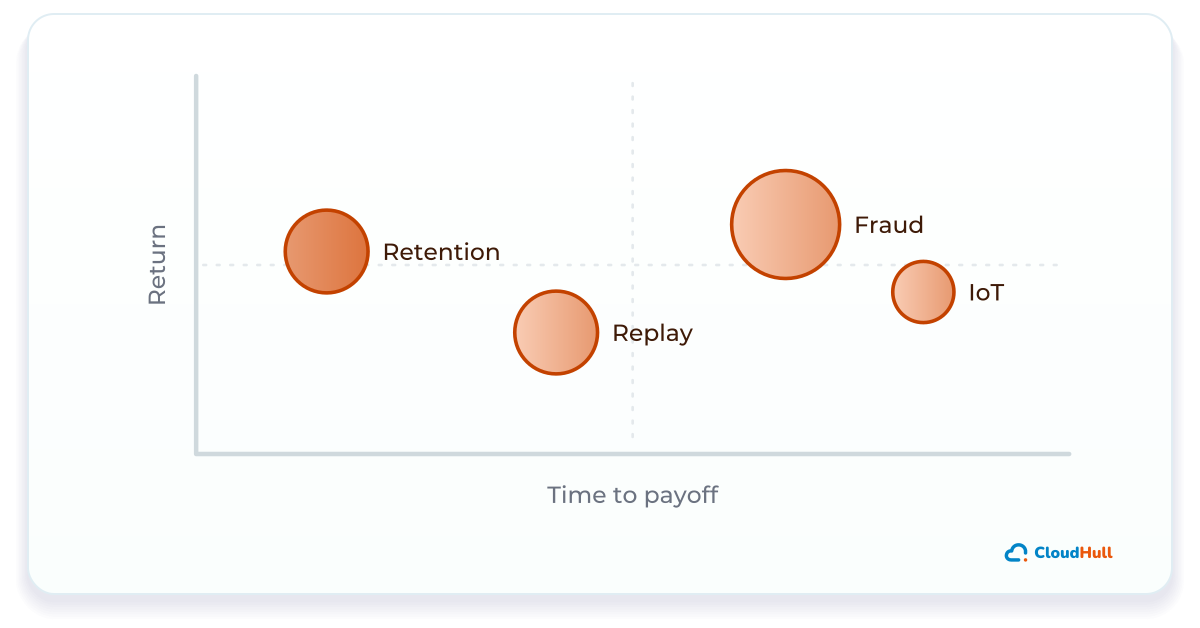
- Retention, warehouse offload and log archives usually pay back first.
- Fraud models, personalization and forecasting need governance and take longer.
- Payback equals build cost divided by monthly saving, using low-end estimates.
- Owners, a catalog and cost reports keep the return from fading.
Teams ask me which data lake use cases are worth doing first, and the honest answer is the ones with a measurable saving or a revenue effect within two quarters. In cloud data lake consulting work, ten use cases keep earning their place, and I rank them here by the return I usually see.
Ranking is judgment. Returns depend on your data volume, your current costs and how quickly you can act on the result. Use the order as a starting point and adjust it with your own numbers. Where I quote a benefit, it comes from my client work, and I say so.
The 10 Use Cases Ranked by ROI
| Use case | Typical industry | Time to payoff | Main return |
|---|---|---|---|
| 1. Cheaper Long-Term Data Retention | Fintech, SaaS | Fast | Lower storage and tool fees |
| 2. Warehouse Offload and Raw Data Replay | All industries | Fast | Smaller warehouse bill |
| 3. Log and Security Analytics Archive | Fintech, SaaS | Fast | Lower logging fees |
| 4. Product and Clickstream Analytics | SaaS, ecommerce | Medium | Better product decisions |
| 5. Fraud and Risk Model Training | Fintech | Medium | Fewer fraud losses |
| 6. Customer 360 and Personalization | Ecommerce, retail | Medium | Higher repeat revenue |
| 7. Demand Forecasting | Retail, logistics | Medium | Less excess stock |
| 8. IoT and Telemetry Analytics | Logistics | Slow | Fewer breakdowns |
| 9. Data Sharing With Partners | Fintech, retail | Slow | New revenue and faster deals |
| 10. Unstructured Document Analytics | Insurance, healthcare | Slow | Faster processing |
How I Rank Data Lake Use Cases
I score each use case on four points: the cost it removes or the revenue it adds, the effort to build it, the risk of data problems and the time to first result. A use case that removes a bill you already pay ranks higher than one that promises future insight. Cheap, fast and measurable wins come first, and they fund the harder projects.
The ranking changes with your situation. A company with a large logging bill should start with retention. One with heavy fraud losses may put model training first. Treat the order as a default and reorder it after a short review of your own costs. My cloud data lake examples show what each of these looks like in practice.
10 Cloud Data Lake Use Cases, Highest Return First
Cheaper Long-Term Data Retention
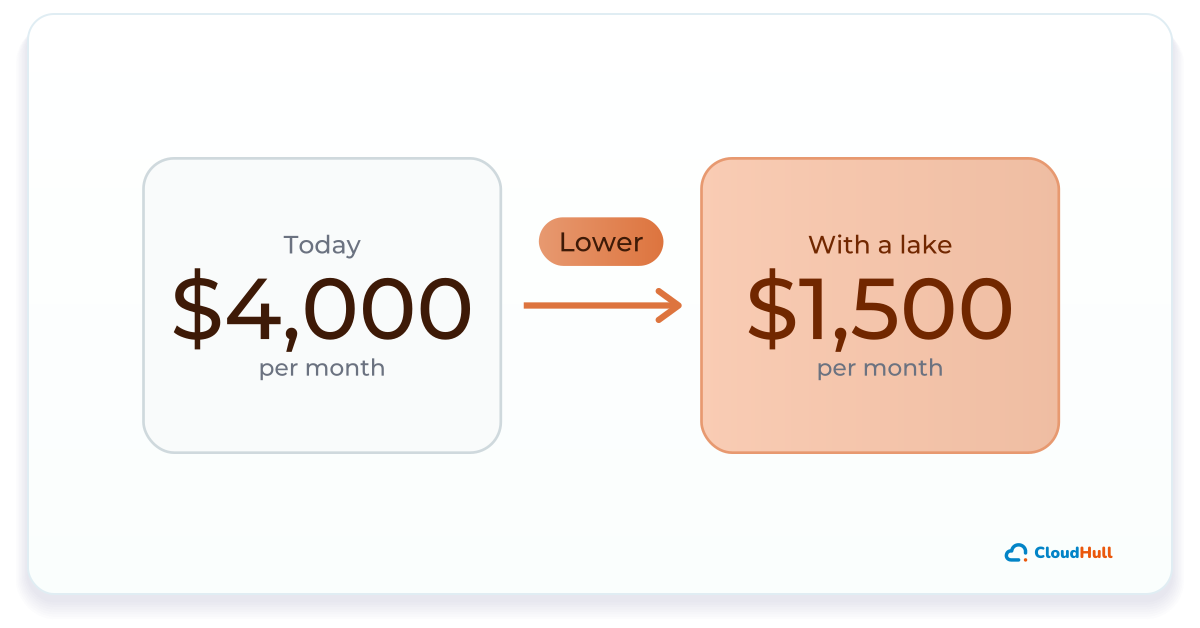
Many companies pay premium prices to keep old data in a database or logging tool. Object storage in a lake costs a fraction per gigabyte, and compressed columnar files shrink it further. In my client work, moving cold data to the lake has cut retention costs by half or more, and the old data stays queryable.
The catch is retrieval speed and access. Plan who can query archived data and how fast they need answers.
How the move is done
- List the datasets and how old they are.
- Set a rule for what counts as cold, such as older than 90 days.
- Copy cold data to object storage in a compressed format.
- Verify row counts against the source.
- Delete from the expensive store and keep a query path.
Tools for this use case
Object storage lifecycle rules and a serverless query engine handle most cases. Native exports from your database or logging tool feed the lake.
Warehouse Offload and Raw Data Replay
Keeping every raw extract inside the warehouse is expensive, and losing them makes backfills painful. A lake holds the raw copy, and the warehouse keeps only the curated tables. When a rule changes, you rerun from the raw files.
The saving comes from smaller warehouse storage and fewer emergency reloads. Check the design with my overview of cloud data warehouse consulting if both are in play.
How the offload works
- Sources land raw files in the lake first.
- The warehouse loads only curated layers.
- Old raw tables are dropped from the warehouse.
- Replay jobs read from the lake when logic changes.
Tools for this use case
Lake storage plus your existing loader tools. A catalog keeps the raw files documented.
Log and Security Analytics Archive
Security teams need long history for investigations, and logging platforms charge by volume. Routing older logs to the lake keeps the history and shrinks the bill. Analysts query the archive with SQL when an incident needs it.
Access control matters here more than anywhere. Restrict the archive to a security role and keep access logs.
How the archive runs
- Logs export to object storage on a schedule.
- Files are compressed and partitioned by day and source.
- Retention locks protect them.
- A query engine handles investigations.
- Costs are reviewed monthly.
Tools for this use case
Native log export and a serverless query engine. A security analytics platform can query the archive for you.
Product and Clickstream Analytics
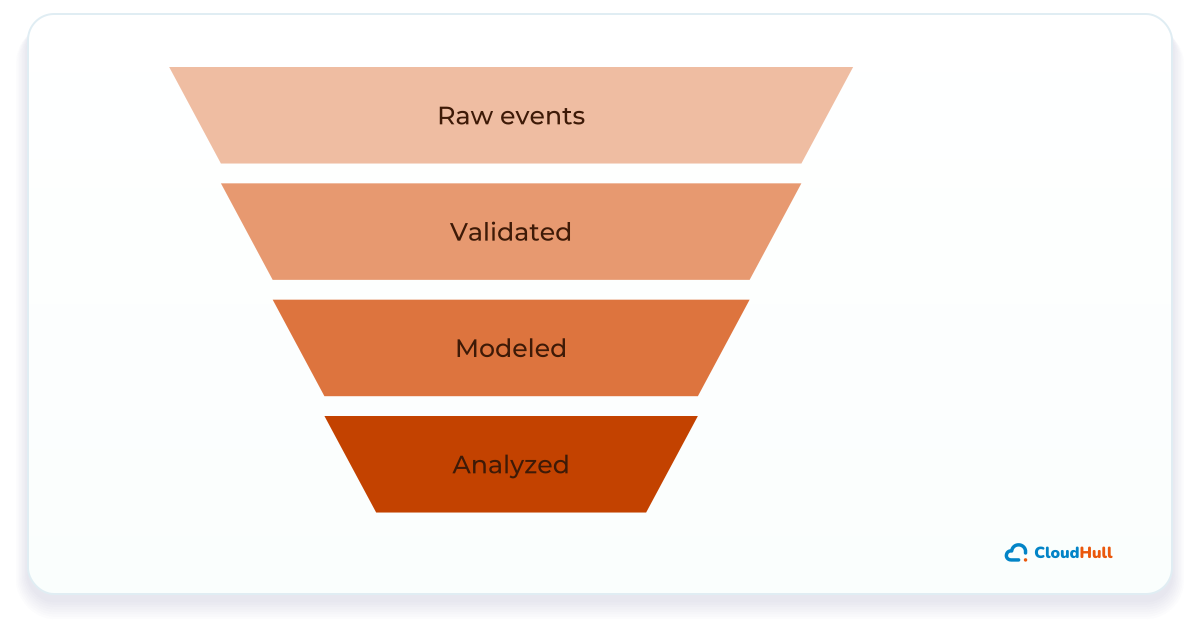
Product teams want to see what users do, and event tables grow faster than any other data. The lake stores raw events cheaply, and models turn them into funnels and retention tables. Product decisions use real behavior, not guesses.
Schema discipline matters. Agree on event names and properties before engineers add new ones.
How events become insight
- Define an event naming standard.
- Stream events to the lake in batches.
- Clean and deduplicate in a curated layer.
- Build funnel and retention tables.
- Share dashboards with product teams.
Tools for this use case
Event collectors, object storage and a transformation tool such as dbt. A BI tool serves dashboards.
Fraud and Risk Model Training
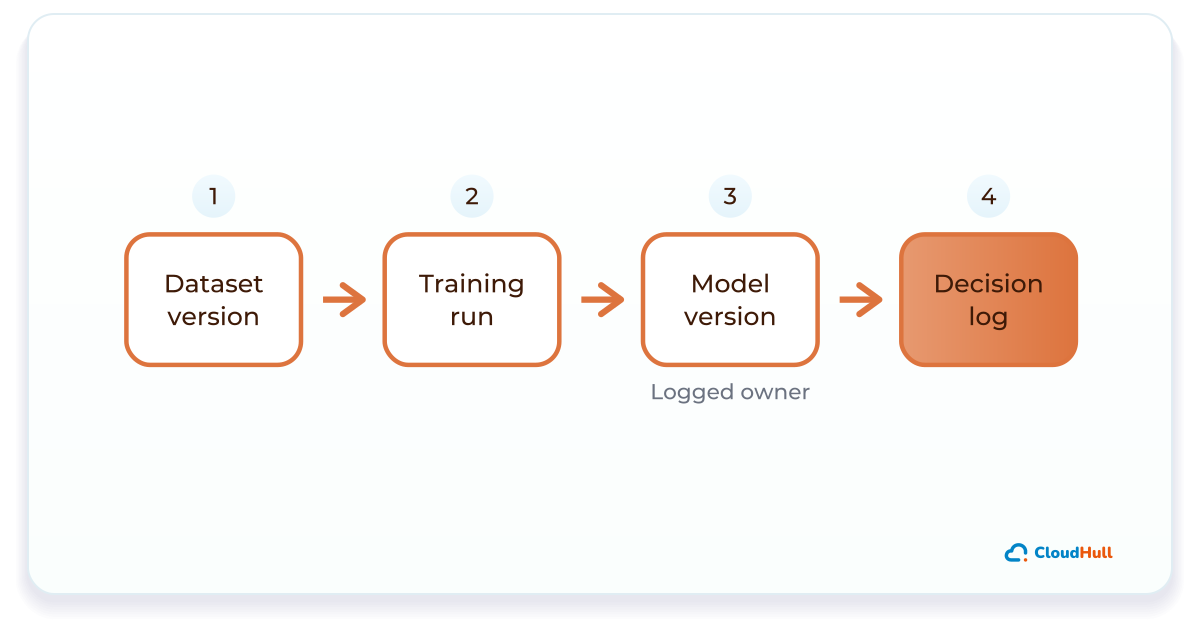
Fraud models improve when they train on years of detailed history. The lake keeps full transaction and device history at a cost a warehouse cannot match, and versioned datasets make training reproducible. Lower fraud losses are the return.
Models need governance. Log which dataset trained which model, and who approved it.
How training data is prepared
- Land raw transactions and device data.
- Build curated feature tables.
- Version each training dataset.
- Train and test models on named versions.
- Deploy and monitor against fresh data.
Tools for this use case
Lakehouse platforms and managed ML services handle training. A feature store helps once several models share features.
Customer 360 and Personalization
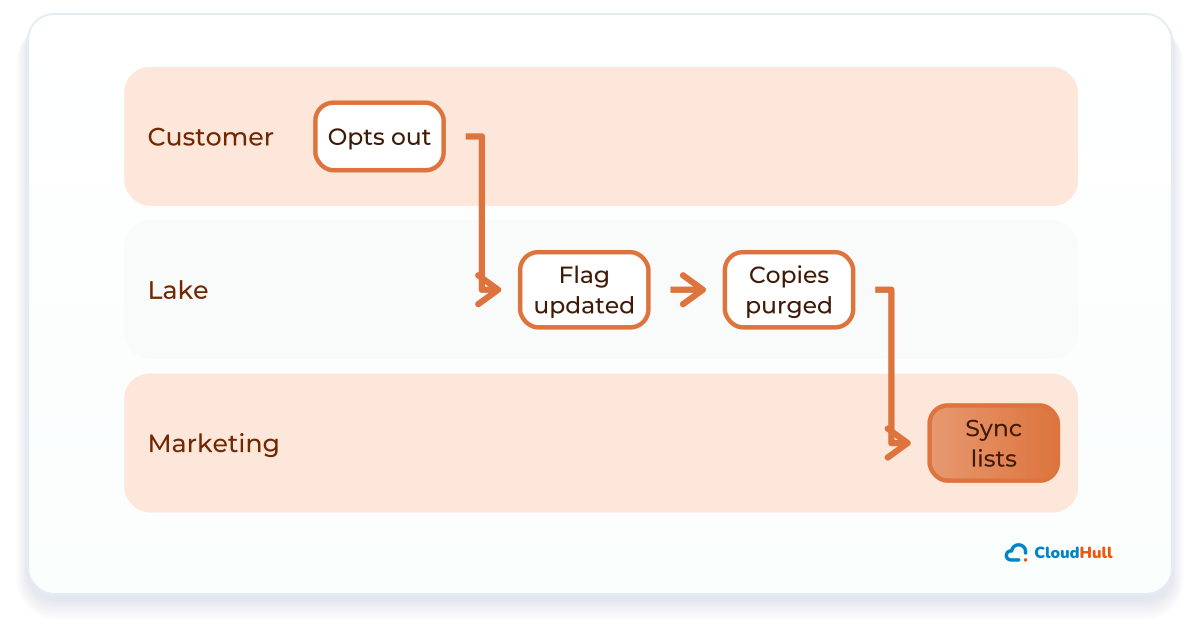
Customer data sits in stores, apps and ad tools. The lake collects it, and matching rules build one profile that marketing and support can use. Better targeting and fewer wasted sends raise repeat revenue.
Consent is the risk. Store and honor consent flags in every copy, and confirm current privacy rules with your advisers.
How profiles are built
- Land customer files from each source.
- Standardize names, emails and phones.
- Match records across sources.
- Attach consent flags.
- Publish the profile to marketing tools.
Tools for this use case
SQL matching rules or a data quality tool, plus reverse ETL to push profiles into business tools.
Demand Forecasting
Forecasts improve with more history and more signals, such as promotions, weather and web traffic. The lake holds them all, and models predict demand by product and location. Less excess stock and fewer stockouts are the return.
Accuracy needs tracking. Compare forecasts with actual sales every week and retrain when errors climb.
How the forecast comes together
- Combine sales, stock and promotion history.
- Add outside signals where they help.
- Train a model per product group.
- Publish forecasts to planners.
- Track error and retrain.
Tools for this use case
Managed forecasting services or open-source libraries, running on lake data.
IoT and Telemetry Analytics
Devices create more data than most databases can hold. The lake stores raw readings and summary tables feed alerts and maintenance plans. Companies see problems before they cause breakdowns.
The effort is high. Plan for late data, duplicates and device changes before you scale.
How readings are used
- Devices send data to an ingestion service.
- Raw readings land in the lake.
- Clean and deduplicate.
- Roll up by device and time window.
- Alert on thresholds and trends.
Tools for this use case
Managed streaming, object storage and a time-series engine for fast dashboards.
Data Sharing With Partners
Sharing data with partners by file transfer is slow and risky. A governed lake can expose selected tables through sharing features, so partners see live data without copies. Deals close faster, and some data products create new revenue.
Legal and privacy review takes longer than the build. Involve them first.
How sharing is set up
- Agree what is shared and with whom.
- Build a curated shared table.
- Apply masking to sensitive fields.
- Grant access through the sharing feature.
- Log every query.
Tools for this use case
Delta Sharing, Snowflake and BigQuery sharing features and cloud clean rooms support this.
Unstructured Document Analytics
Contracts, claims and images hold information that no table captures. The lake stores the files, and document AI extracts text and fields into tables. Processing time falls, and search becomes possible.
Accuracy needs review. Keep a person checking extractions on high-value documents.
How documents turn into data
- Upload files with metadata.
- Extract text and fields.
- Store results in tables.
- Review a sample for accuracy.
- Make results searchable with access controls.
Tools for this use case
Cloud document AI services plus metadata tables in the lake.
Putting a Number on Your Own ROI
For each use case, write three lines: what you pay for today, what you expect to pay after the change and what it costs to build. The payback is build cost divided by monthly saving. A retention project that costs $20,000 and saves $2,500 a month pays back in eight months. A model project that costs the same and prevents $1,000 a month of fraud takes twenty.
Use your own figures, and use the low end of every estimate. Add the running cost of the lake, since someone has to keep it healthy. For platform habits that protect the return, see my notes on cloud data lake best practices.
| Step | Question | Example answer |
|---|---|---|
| 1 | What do you pay today? | $4,000 a month for log retention |
| 2 | What will you pay after? | $1,500 a month in storage and queries |
| 3 | What does the build cost? | $20,000 one time |
| 4 | Payback in months | 20,000 / 2,500 = 8 |
How to Choose Your First Data Lake Use Case
Choose the use case that removes a bill you already pay and that you can measure in one quarter. Retention, warehouse offload and log archives fit that description for most companies. Models, personalization and sharing come next, once the foundation is governed.
- Which existing cost will it reduce?
- Who owns the data and acts on the result?
- Does it involve personal or regulated data?
- How long to the first measurable result?
Questions About Cloud Data Lake Use Cases
Which Data Lake Use Case Has the Fastest Return?
Cheaper long-term retention, warehouse offload and log archives usually pay back first, because they replace a bill you already pay. The saving appears in the first months after the move.
Do I Need a Data Lake for Machine Learning?
Not always, but a lake makes it easier to keep long history and versioned training sets. For small models, a warehouse may be enough. The lake helps when data is large, varied or needed in raw form.
How Do I Estimate the Return on a Data Lake?
Write down what you pay today, what you expect to pay after and what the build costs. Divide build cost by monthly saving for payback. Use the low end of every estimate and include running costs.
Can a Data Lake Replace My Data Warehouse?
Sometimes, using a lakehouse design with table formats and a query engine. Many companies keep both, with the lake as the raw store and the warehouse for curated reporting.
What Are the Main Risks of a Data Lake?
Missing owners, no catalog, tiny files, unclear zones and unmonitored cost. Personal data adds privacy risk. Each has a fix that costs far less than rebuilding a swamp.
How Much Data Do I Need Before a Lake Makes Sense?
There is no fixed threshold. Large, fast-growing or varied data, such as events, logs and documents, benefits first. If your data is small and tidy, a warehouse is simpler.
How Do I Start Without a Big Project?
Pick one dataset with a clear owner, land it in object storage, register it in a catalog and query it. Measure cost and use for one quarter, then decide on the next dataset.
Sources
Please note: this guide is general information and not legal, financial or tax advice. Numbers and examples are typical-project estimates; confirm current details with your providers and advisers.
Did this article help you?
Thanks, noted.
Garrett Linville
Garrett leads the Cloud Hull editorial team and works with the consultants to turn real client projects into practical guides on cloud migration, DevOps, security and cost control. Each article is edited together with the consultant who did the work, and every price and limit is checked against current provider documentation. He is based in the USA and works remotely.