Main Points
- Plan addresses, segments and ownership before you build the first network.
- Deny by default in both directions and keep managed services on private endpoints.
- Rehearse failover and review rules, costs and links every quarter.
- Write the network as code so every change has a reviewer and a history.
Most cloud networking trouble comes from shortcuts that were reasonable on day one. A default address range, an open outbound rule or a single link gets the project live, and the bill for it arrives a year later. The ten rules below come from reviews I run as part of cloud networking consulting, mostly for fintech and ecommerce teams.
Each rule has a short explanation, a do this line and an avoid this line. If you only have time for three, start with the first, third and sixth. Those are the gaps I find most often.
The 10 Practices at a Glance
| Practice | Do this | Avoid this |
|---|---|---|
| 1. Write the IP Plan Before the First Network | Plan ranges per region and environment | Default ranges picked in a hurry |
| 2. Separate Networks by Environment and Sensitivity | Isolate production, test and shared services | One flat network for everything |
| 3. Deny by Default in Both Directions | Allow only named traffic, inbound and outbound | Any-to-any rules for convenience |
| 4. Reach Managed Services Over Private Endpoints | Keep storage and database traffic private | Public endpoints on data services |
| 5. Use a Hub When Peering Gets Messy | Route through a hub beyond a few networks | A full mesh of peerings |
| 6. Build Two Paths for Anything Critical | Redundant links and a rehearsed failover | A single link or a single zone |
| 7. Define the Network in Code | Version every network and rule | Console changes nobody records |
| 8. Log Flows and DNS Before You Need Them | Turn on flow and DNS logs early | Starting logs during an incident |
| 9. Control Egress and Watch the Gateway Bill | Limit outbound paths and know their cost | Open outbound access through managed NAT |
| 10. Name an Owner and Review Every Quarter | Assign owners and review on a schedule | A network nobody feels responsible for |
1. Write the IP Plan Before the First Network
Every cloud network starts with an address range, and the default is rarely the right one. Two networks with overlapping ranges cannot be peered or joined through a hub without translation, and translation is slow, fragile and hard to debug.
Take one afternoon to split a private block into ranges per region, environment and account. Leave at least half of it unassigned for acquisitions and new regions. Record each allocation with an owner, and check new networks against the plan in your pipeline.
Do this: Keep one reviewed address plan and reserve space for growth.
Avoid this: Letting each team choose its own range from the console default.
2. Separate Networks by Environment and Sensitivity
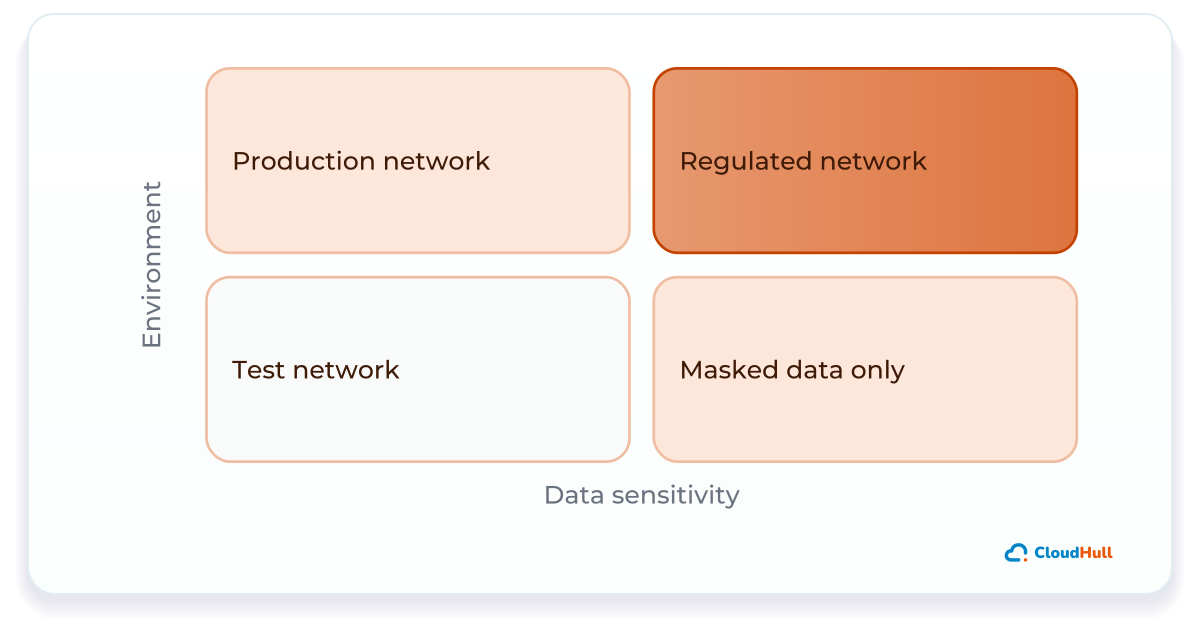
A flat network lets a compromised test server reach production databases. Separate networks, ideally in separate accounts, give each environment its own blast radius and its own permissions.
Add a second axis for data sensitivity. Systems that touch card data or personal data get their own network with stricter rules, so an audit has a clear boundary to review. Shared services such as DNS and logging live in their own network that every other one can reach.
Do this: Give production, staging and shared services their own networks and accounts.
Avoid this: Placing test tools in the same network as live customer data.
3. Deny by Default in Both Directions
Security groups and firewall rules should start from nothing and add only what a workload needs. Most teams get inbound right and leave outbound open, which gives an intruder a free path to send data out.
Name every rule after the application it serves and give it an owner. Rules with no owner and no recent traffic are candidates for removal. I review them quarterly, and the first review usually finds a few that were opened for a one-day test two years earlier.
Do this: Write rules per application, review unused ones and monitor before you enforce.
Avoid this: Rules that allow every port from every internal range.
4. Reach Managed Services Over Private Endpoints
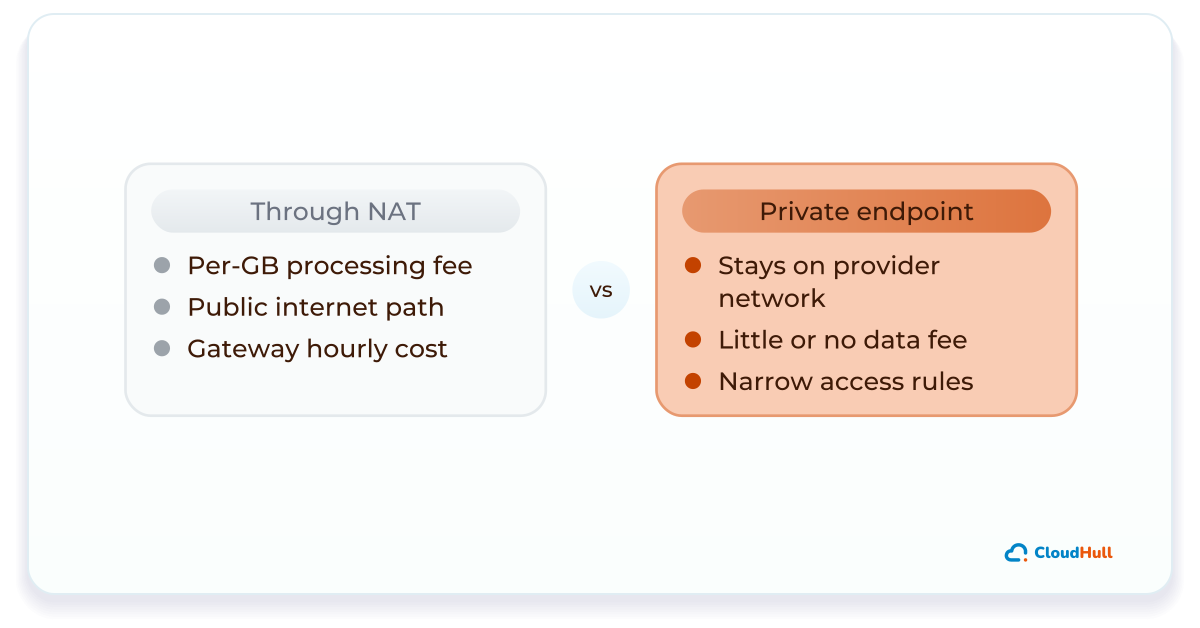
Managed databases, storage and queues default to public endpoints. A private endpoint puts the service inside your network, so only your workloads reach it, and the traffic stays on the provider's backbone.
Plan DNS first. Names must resolve to private addresses from every network that needs them, including offices and VPN clients. Skipping this step is the most common reason a private endpoint rollout stalls for a day.
Do this: Create private endpoints, link private DNS to every consumer and then close public access.
Avoid this: Closing public access before testing name resolution.
5. Use a Hub When Peering Gets Messy
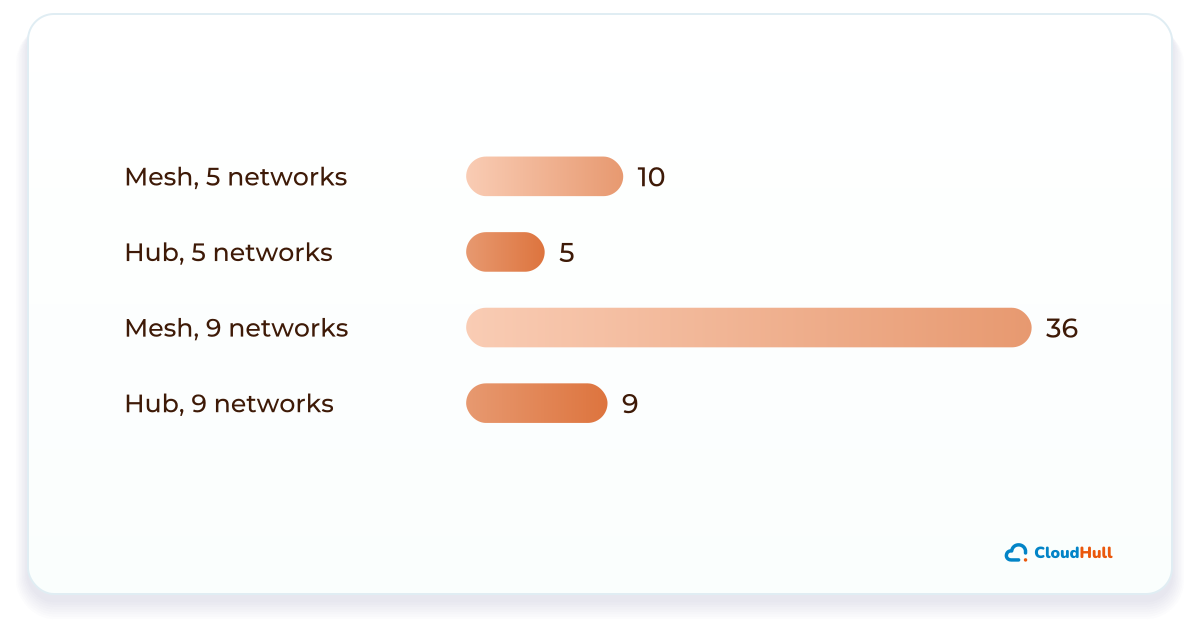
Peering works well for two or three networks. By ten, the connections form a mesh that no one can draw, and every new network adds several links to maintain. A hub such as AWS Transit Gateway or Azure Virtual WAN turns the mesh into a star.
Hubs charge for attachments and traffic. AWS lists a $0.02 per GB data processing charge for Transit Gateway on its pricing page, so I keep direct peering for the few pairs that move the most data.
Do this: Move to a hub at about five networks and keep peering for heavy pairs.
Avoid this: Adding peering number nine because it is quicker today.
To see hubs in real designs, example one in my list of cloud networking examples walks through the build.
6. Build Two Paths for Anything Critical
Every critical path needs a second route: two dedicated circuits in different facilities, a VPN as a third option and gateways in at least two zones. A diagram of redundancy tells you nothing until traffic has actually moved across it.
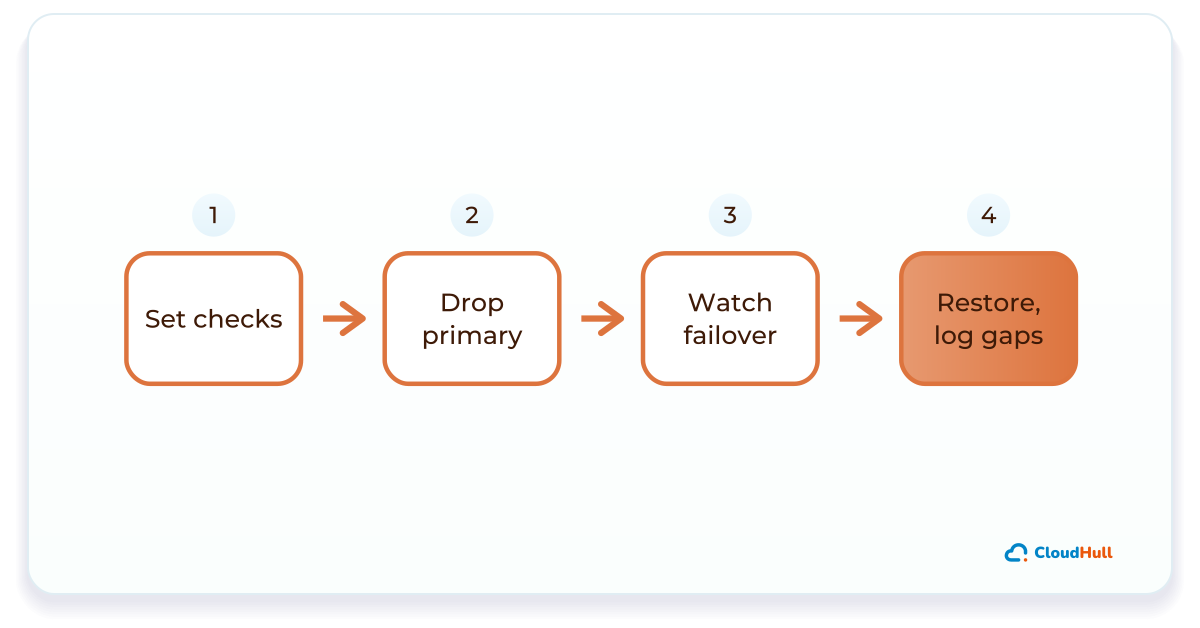
Rehearse the failover every quarter in a maintenance window. Take the primary down, watch the secondary carry traffic and write down what broke. Teams that do this once usually fix several surprises in the first session.
Do this: Test failover on a schedule and alert on link state and route changes.
Avoid this: Trusting a second circuit that has never carried traffic.
7. Define the Network in Code
Networks written as code give you history, review and repeatable environments. A rule change shows who made it, why and what it replaced. Rebuilding a region after a mistake becomes a command, not a weekend.
Include the parts that drift fastest: route tables, DNS records and firewall rules. Require a reviewed plan before any change to production, and use drift detection to catch edits made in the console.
Do this: Keep networks in version control and require reviewed plans.
Avoid this: Hotfixes in the console that never make it back into the code.
8. Log Flows and DNS Before You Need Them
You cannot investigate traffic that nobody recorded. Flow logs on hubs, gateways and production networks, plus DNS query logs, answer most questions about timeouts and suspicious connections.
Logs cost money, so be selective and keep them in cheap storage with a retention rule. A handful of saved queries, such as denied traffic by rule and top talkers by cost, covers most investigations.
Do this: Log hubs, gateways and production networks and save the common queries.
Avoid this: Enabling logging after the incident has started.
9. Control Egress and Watch the Gateway Bill
Outbound traffic is both a security and a cost topic. A managed NAT gateway on AWS lists $0.045 per hour plus $0.045 per GB processed in US East (Ohio), and public IPv4 addresses are listed at $0.005 per hour each, used or idle.
Route heavy traffic to storage and registries through private endpoints, release idle addresses and allow only named destinations for the rest. The same change tightens security and lowers the bill.
Do this: Allow named destinations and keep heavy traffic off NAT.
Avoid this: Leaving idle gateways and public addresses running for months.
Tooling can help here, and my ranking of cloud networking tools shows which ones add value on top of the native services.
10. Name an Owner and Review Every Quarter
Every network, gateway and rule set needs a named owner. When something fails or costs too much, the first question is who decides. Without an answer, problems wait.
Hold a short quarterly review. Check the address plan, unused rules, link health, costs and the last failover test. Thirty minutes with the right people beats a large annual project.
Do this: Tag every resource with an owner and schedule the review.
Avoid this: Assuming the team that built it still watches it.
Looking ahead, the shifts that will change these rules are covered in cloud networking trends.
A Quick Self-Check for Your Team
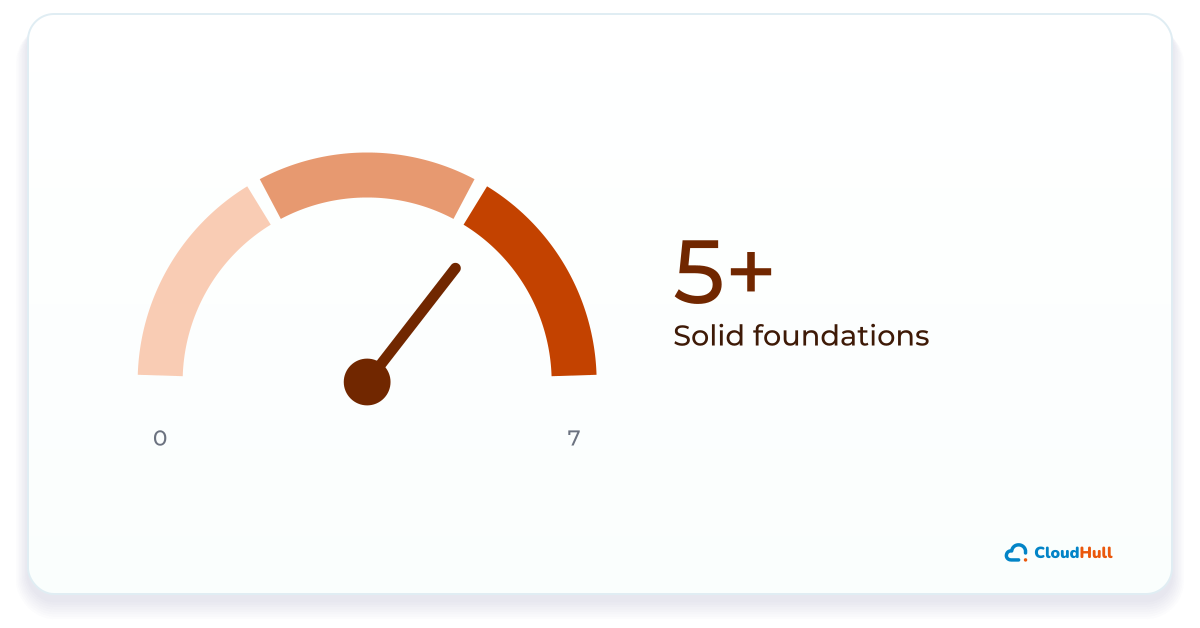
Score yourself honestly. One point for each statement that is true today.
| Statement | Practice |
|---|---|
| We have a written address plan | 1 |
| Production has its own network and account | 2 |
| Outbound traffic is restricted by name | 3 and 9 |
| Data services are reached privately | 4 |
| We have tested failover this quarter | 6 |
| Every network change goes through code review | 7 |
| Someone owns each network and its bill | 10 |
Five or more means your foundations are solid. Three or fewer means you should pause new projects and fix the basics first, because every new workload inherits the gaps.
Run the check with the people who carry the pager, not only the architects. Operators usually know which rules are fiction, such as the failover that has never run or the log nobody reads, and their answers make the score honest. Repeat it every quarter and keep the results, so you can see whether the gaps are closing.
How to Choose Which Practice to Adopt First
Pick by pain. If you have had a security scare, start with segmentation and default-deny rules. If you are preparing to connect a second network or an acquired company, start with the address plan. If the bill surprised you, start with egress and the gateway line items.
- What was the last network incident, and which practice would have stopped it?
- Which rule on this list would be hardest to add in a year?
- Which change can your team finish in a single sprint?
The hardest to add later is almost always the address plan, so I rank it first.
Questions About Cloud Networking Best Practices
What Are the Most Important Cloud Networking Best Practices?
A written IP plan, separate networks per environment, default-deny rules in both directions and private endpoints for managed services. Those four remove most of the problems I see in reviews.
How Should I Segment a Cloud Network?
Start with one network per environment and per sensitivity level, ideally in separate accounts. Add smaller segments within a network for tiers such as web, application and data, and allow traffic between tiers only on named ports.
When Should I Move from Peering to a Hub?
Around five or six networks, or sooner if you expect to grow quickly. Keep direct peering for pairs that move large volumes, because hubs charge for traffic processed.
Do I Need a Dedicated Connection to the Cloud?
Only when latency, bandwidth or compliance needs call for it. A site-to-site VPN is enough for many first projects. When you do order a dedicated link, plan two in different facilities.
How Do I Reduce Cloud Networking Costs?
Review data transfer, NAT and public address charges monthly, release idle addresses, use private endpoints for heavy storage traffic and compare hub and peering costs for your biggest flows.
How Often Should I Review Firewall and Security Group Rules?
Quarterly is a good rhythm. Look for rules with no recent traffic, broad ranges and missing owners, and remove what no one can justify.
Should Networking Be Managed as Code?
Yes. Code gives you review, history and repeatable environments, and it makes drift visible. Start with networks and routes, then add DNS and firewall rules.
Sources
Please note: this guide is general information and not legal, financial or tax advice. Numbers and examples are typical-project estimates; confirm current details with your providers and advisers.
Did this article help you?
Thanks, noted.
Garrett Linville
Garrett leads the Cloud Hull editorial team and works with the consultants to turn real client projects into practical guides on cloud migration, DevOps, security and cost control. Each article is edited together with the consultant who did the work, and every price and limit is checked against current provider documentation. He is based in the USA and works remotely.