Main Points
- Pricing for public addresses and outbound traffic pushes teams toward IPv6, private paths and tighter egress.
- Access and segmentation policy is moving from IP ranges to identity and workload tags.
- AI workloads raise bandwidth and transfer questions that your current design may not answer.
- Pilot new features with a budget and a deadline before you commit your whole network.
Cloud networking changes more slowly than most layers of the stack, which makes the shifts that do arrive worth noticing. In cloud networking consulting work with fintech, ecommerce and SaaS teams, eleven themes keep coming up in planning meetings.
I sort them by how much they should change your decisions this year. Some are mature enough to build on. Some deserve a small pilot, and a few are noise. Where a claim needs a source, you will find it linked at the end.
The 11 Trends at a Glance
| Trend | Maturity | What to do now |
|---|---|---|
| 1. Public IPv4 costs and IPv6 adoption | Mainstream | Audit addresses and plan dual stack |
| 2. Zero-trust access replaces the flat VPN | Mainstream | Pilot with one team |
| 3. Policy by workload identity and tag | Growing | Start in monitor mode |
| 4. Private paths to managed and SaaS services | Mainstream | Plan DNS first |
| 5. Managed cloud hubs | Mainstream | Model cost against peering |
| 6. Interconnect on demand | Growing | Use for multi-cloud and fast changes |
| 7. Networks built for AI traffic | Growing fast | Measure data movement before you design |
| 8. Observability across flows and paths | Growing | Add path tests for critical journeys |
| 9. Network and policy as code | Mainstream | Require reviewed plans |
| 10. FinOps for data transfer | Growing | Give every team a transfer budget |
| 11. Multi-cloud connectivity | Mixed | Decide by need, not fashion |
1. Public IPv4 Costs Push IPv6 Higher on the Roadmap
AWS lists $0.005 per hour for every public IPv4 address, whether it is in use or idle. That is roughly $3.65 per address per month, which sounds small until you count load balancers, NAT gateways and forgotten instances across many accounts. Other providers have their own pricing for public addresses.
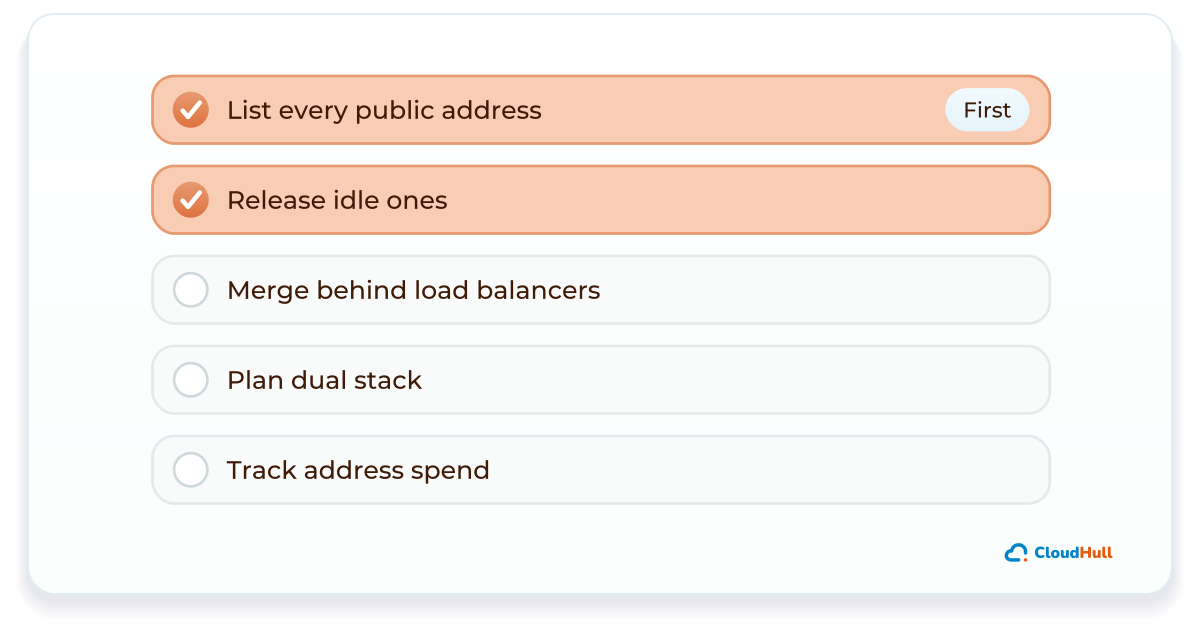
The first step is not IPv6, it is an inventory. Release idle addresses and see how many you really need. Then plan dual stack for new services, because partners and some office networks still depend on IPv4. IPv6 changes firewall rules and monitoring, so give your security team time to test.
2. Zero-Trust Access Replaces the Flat VPN
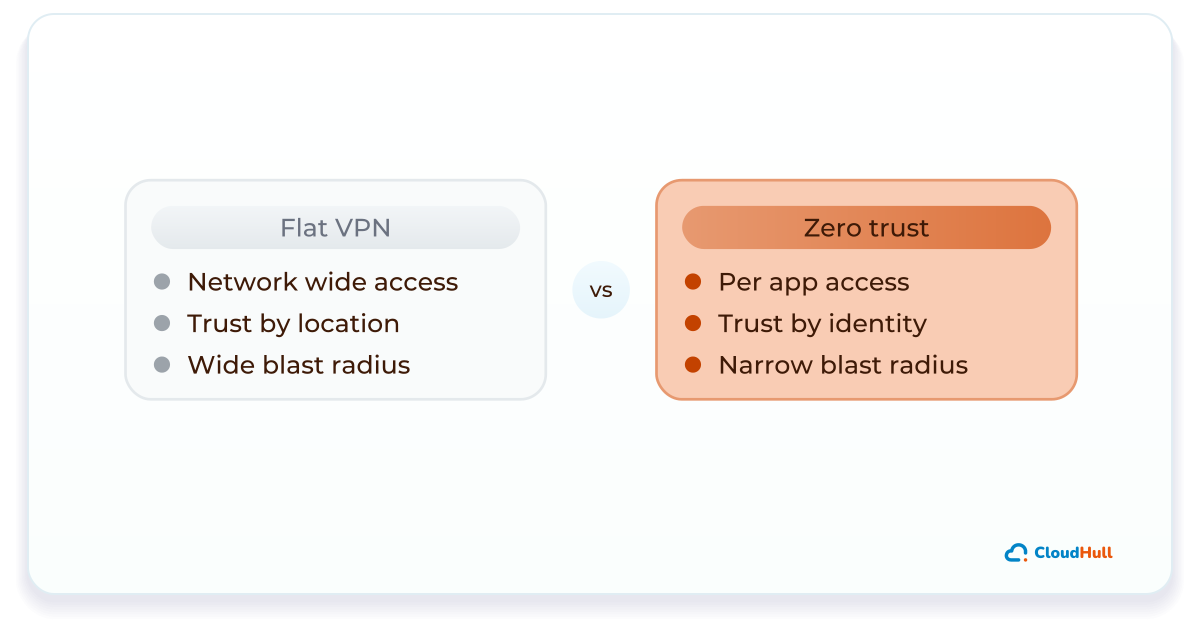
Traditional VPNs put a user on the network. Newer tools grant access to one application at a time and check the user and device on every request. Tailscale lists a free plan for up to 6 users for non-commercial use and paid plans from $8 per user per month, and Cloudflare offers a free plan for a proof of concept.
Adoption is easiest with a small group. Developers reaching staging or contractors reaching one tool are good first pilots. Keep a plan for the exceptions, because some legacy systems and site-to-site links will keep tunnels for years. The practical side of this shift is in example seven of my list of cloud networking examples.
3. Policy Moves From IP Ranges to Workload Identity
Rules written as address ranges break when workloads move or scale. Policy that follows tags, groups and identities survives those changes. Aviatrix prices its outbound and lateral containment per covered workload, which shows the direction: the unit of control is the workload, not the subnet.
The catch is tagging discipline. A rule that depends on a tag is only as good as the tag, so enforce tags in your pipeline and review the ones that grant access. Start in monitor mode and look at what the policy would have blocked before you turn it on.
4. Private Paths to Managed and SaaS Services
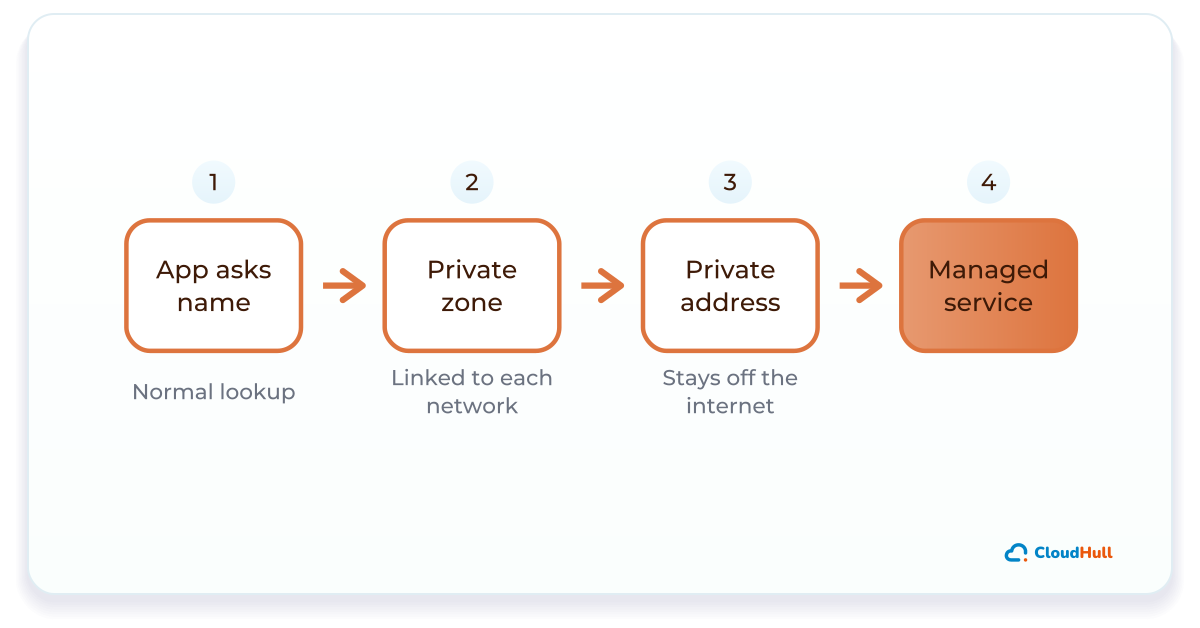
Providers and software vendors now offer private endpoints for databases, storage, queues and many SaaS products. Traffic stays off the public internet, and public access can be switched off entirely.
The work is in DNS. Names must resolve to private addresses from every network that needs them, including offices and VPN users. I would plan that before moving the first service, and test from a build server and a laptop.
5. Managed Cloud Hubs Become the Default
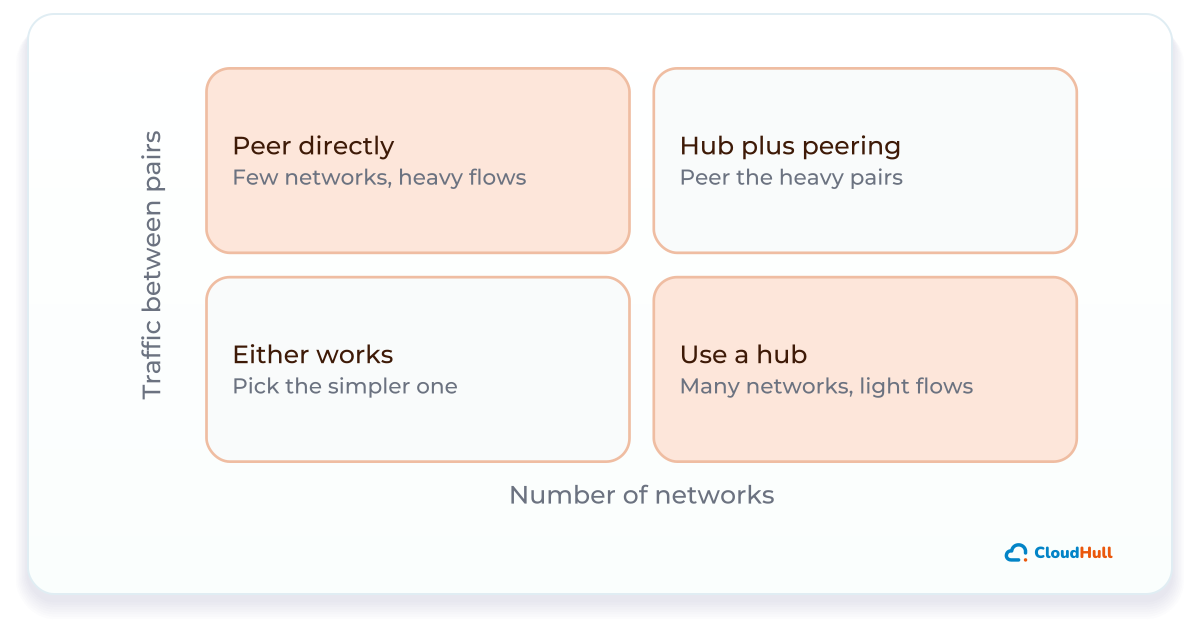
AWS Transit Gateway and Azure Virtual WAN take over routing between networks that teams used to build by hand. They reduce the mesh of peerings to a star and give you one place for logs and inspection.
Hubs bill for attachments and traffic. AWS's own pricing example lists $0.02 per GB processed, so heavy pairs can be cheaper over direct peering. Model both before you commit, and keep a short list of exceptions.
6. Interconnect on Demand Reaches the Mid-Market
Private connections to clouds used to mean long procurement cycles. Providers such as Megaport now sell ports and virtual connections through a portal, with listed monthly prices that start at US$615 for a data center to cloud connection.
Speed of ordering does not remove the need for redundancy. Plan two ports in different facilities and rehearse a failover. For teams that run a second cloud, cloud-to-cloud links give a private path between providers without building your own backbone.
7. Networks Get Rebuilt Around AI Traffic
Training jobs, vector stores and model endpoints move large amounts of data, often between regions or between a cloud and an on-premises source. Bandwidth, placement and transfer cost become design inputs rather than afterthoughts.
I would not design a special network yet. Measure where your data sits, how much moves and which paths the new services use, then place compute close to the data. Provider documentation changes quickly here, so check current network options before you plan.
8. Observability Spans Flows, Paths and Applications
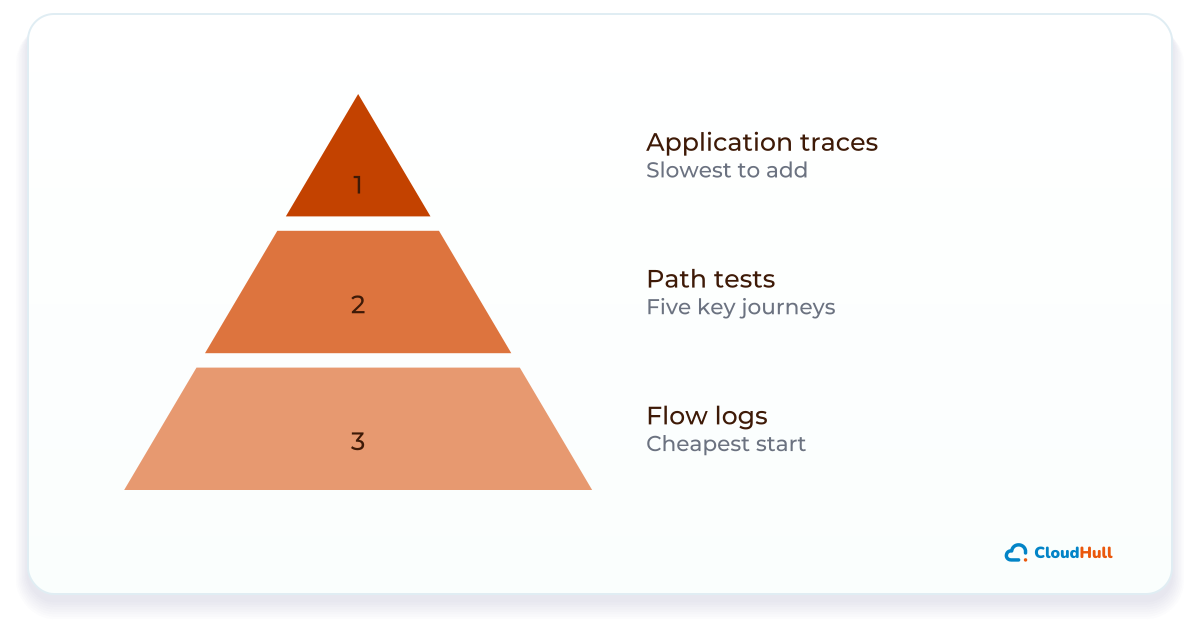
Native flow logs answer what happened inside your network. They say little about the internet between you and your users. Tools such as ThousandEyes test paths from outside, Kentik analyzes flow data across clouds and sites, and Datadog places network data next to logs and traces.
Do not buy all three. Add path tests for the five journeys that matter most to revenue, and look at flow analysis if your native views stop answering questions. My ranking of cloud networking tools compares prices and review scores.
9. Network and Policy Become Code as a Matter of Course
Code review for networks is now normal in mature teams. Every route, rule and DNS record lives in version control, and drift detection flags console edits. The change is cultural more than technical.
The next step is policy as code, where automated checks reject a change that opens a database port to the world or creates an overlapping range. The rules behind those checks are in my list of cloud networking best practices.
10. FinOps Reaches Data Transfer and Gateways
Compute and storage got cost attention first. Networking lines are next: NAT gateways, cross-zone traffic, hub processing and public addresses. A NAT gateway on AWS lists $0.045 per hour plus $0.045 per GB processed in US East (Ohio), which makes heavy downloads through NAT a visible cost.
Give every team a transfer budget and show them the lines. Fixes are usually simple, such as private endpoints for storage and registries, or placing chatty services in the same zone when resilience allows.
| Cost line | Typical cause | First fix |
|---|---|---|
| NAT gateway processing | Heavy downloads and updates through one gateway | Private endpoints for storage and registries |
| Public IPv4 addresses | Idle addresses and one per load balancer | Release unused ones and consolidate |
| Hub data processing | Large flows between a few networks | Peer the heavy pairs directly |
| Cross-zone and cross-region traffic | Chatty services spread across zones | Keep tight pairs together where resilience allows |
11. Multi-Cloud Connectivity Matters Less Than the Hype Suggests
Some companies need two clouds because of an acquisition, a customer or a specific service. For them, interconnect providers and multi-cloud network tools reduce the work. For most others, a second cloud adds cost, skills and failure modes.
Decide by need. If you do run two clouds, start with one shared address plan and one way to log traffic, and add tools only where the gaps show. Rules for data location differ by country and change, so check current requirements with your advisers.
Trends I Would Not Chase Yet
Fully autonomous network changes made by an AI agent with no review are impressive in demos and risky on a production network. Use agents to draft changes and explain flow logs, and keep a person approving what reaches production. Measure how often the draft is right on your own network before you trust it with more.
Automatic failover between clouds is another idea that sounds better than it works. State, data and identity all have to follow, and most teams have not rehearsed that. A tested failover between regions of one cloud is a better first goal.
What These Trends Mean for Your Budget
Most trends move cost from fixed to variable. That is good news if you watch it and bad news if you do not. A practical plan has three parts: a monthly review of the biggest network lines, a transfer budget and alert for every team, and a rule that every new feature gets a cost estimate before it touches production traffic.
Keep a small buffer for pilots. A pilot that costs a few percent of the network budget and tells you whether a trend fits is cheap compared with a rollout that does not. Close each pilot with a short written result, so the next planning round starts from facts.
Questions to Ask Your Provider About Each Trend
Announcements are written to sound finished. These questions find out whether a feature works for you today:
| Question | Why it matters |
|---|---|
| Is it generally available or in preview? | Preview features can change or disappear |
| What does it cost per unit of traffic? | Per-GB charges decide the bill on busy paths |
| Which regions and clouds support it? | Partial coverage leaves custom work for you |
| How are logs and access rules handled? | Governance must follow traffic into new features |
Write the answers next to the pilot plan. Six months later you can compare what you were told with what you saw.
How to Choose Which Trends to Act On
Rank each trend by two questions: does it solve a problem you have today, and is it mature enough to rely on? A yes to both belongs in this year's plan. A yes to only the first deserves a pilot with a deadline and a success measure.
- Which cost, risk or speed problem would the trend fix for you?
- Does your provider support it in production?
- What does a pilot cost, and who runs it?
- How will you know in 60 days that it worked?
Questions About Cloud Networking Trends
What Is the Biggest Cloud Networking Trend Right Now?
Moving from address-based rules to identity and workload-based policy. It affects access, segmentation and egress control, and it is the shift I see most teams planning for.
Is IPv6 Worth Adopting in the Cloud?
For new internet-facing and internal services, it is worth planning. Providers now charge for public IPv4 addresses, for example $0.005 per hour on AWS, so the cost argument adds to the technical one. Move step by step and keep dual stack where partners need IPv4.
Will Zero-Trust Access Replace VPNs Completely?
For most user-to-application access, yes over time. Site-to-site links and some legacy systems will keep tunnels for years. Plan a gradual move, starting with one team and one application.
How Is AI Changing Cloud Networking?
Training and inference move large volumes of data, so bandwidth, placement and transfer cost matter more. Teams also need private paths to model services and data stores. Check provider documentation for current network options before you design.
Do I Need a Multi-Cloud Network?
Only when you run real workloads in more than one cloud or a customer requires it. Otherwise, the added tooling and skills cost more than they return.
How Should I Budget for Networking Next Year?
Start from your last three months of data transfer, gateway and address charges, add growth and set an alert per team. Treat pilots for new features as a small separate line.
Which Trends Can I Safely Ignore?
Anything that needs a new platform to solve a problem you cannot name. Fully autonomous network changes and automatic multi-cloud failover with no rehearsal are two I would not chase yet.
Sources
Disclaimer: This article is for general information only and is not legal, financial or tax advice. Provider features and prices change often, so check current documentation before you decide.
Did this article help you?
Thanks, noted.
Garrett Linville
Garrett leads the Cloud Hull editorial team and works with the consultants to turn real client projects into practical guides on cloud migration, DevOps, security and cost control. Each article is edited together with the consultant who did the work, and every price and limit is checked against current provider documentation. He is based in the USA and works remotely.