Main Points
- Start with a queue where the pain already shows up in your reports.
- Data quality decides whether self-service and agent assist work.
- Usage billing needs budgets and alerts from day one.
- Keep a fast path to a person in every automated flow.
Cloud contact center advice is easy to find and hard to apply. What helps most is seeing how a specific team set up a specific queue, what it cost them in effort, and where it went sideways. In my cloud contact center consulting projects, the same ten setups come up again and again, in fintech, ecommerce and software companies.
Each example below describes what changed, how the setup works step by step and the tools that fit. The results are ranges from my client work, so treat them as a starting point and measure your own baseline first.
Ten Setups at a Glance
| Example | Best for | Typical effect in my projects |
|---|---|---|
| 1. Order Status Self-Service | Ecommerce | About a quarter of contacts handled without an agent |
| 2. Callback Instead of Hold | Any voice queue | Fewer abandoned calls at peak |
| 3. Skills-Based Routing by Intent | Mixed-skill teams | Fewer transfers per contact |
| 4. Agent Assist During Live Calls | Complex products | Shorter handle time on new agents |
| 5. Automatic After-Call Summaries | High-volume voice | Wrap-up time cut by about half |
| 6. Fraud and Identity Checks in the Flow | Fintech | Verification moves from agent to system |
| 7. Burst Capacity for Seasonal Peaks | Retail and travel | No extra seats bought for the peak |
| 8. Unified Customer Record in the Agent Screen | Multichannel teams | Fewer repeat questions to customers |
| 9. Full-Coverage Quality Scoring | Teams over 30 agents | Coaching starts within days, not weeks |
| 10. Cost Tags and Budgets per Queue | Usage-billed platforms | Surprise bills stop |
Ten Cloud Contact Center Examples and How They Work
I start with the setups that pay back fastest and finish with the ones that protect your budget. The cost side of these choices is covered in my guide to cloud contact center cost.
Order Status Self-Service
An online retailer I worked with found that a large share of its calls and chats were 'where is my order' questions. We connected the contact center platform to the order system, so a customer could ask by voice or chat and get a tracking answer in seconds. After eight weeks, a little over a quarter of contacts finished without an agent.
The detail that made it work was the order data. Tracking numbers were stored in two systems that disagreed on about one order in twenty, so the first month went into cleaning that up. Without that step, the assistant would have given wrong answers faster.
How the flow runs
- The customer says or types an order number, or the system finds it from the phone number.
- The platform calls the order system through an API.
- It reads back status, carrier and expected date.
- If the order is late or the status is unclear, the contact goes to a person with the order already on screen.
- Customers who ask for an agent at any point are transferred without repeating themselves.
Tools that fit
Amazon Connect, Genesys Cloud and Google Cloud's contact center offerings all connect to order systems through APIs. Keep the lookup logic in a small service of your own, so you can change platforms without rebuilding it.
Callback Instead of Hold
A fintech support line saw abandoned calls spike each morning when card alerts went out. Instead of adding agents, the team offered a callback that held the caller's place in the queue. Abandonment at the morning peak dropped by roughly a third, and agents saw a steadier workload.
The first version failed because callbacks went out on the hour and created a new peak. Spreading them across the shift fixed it. Test the timing rules with a week of real traffic before you launch.
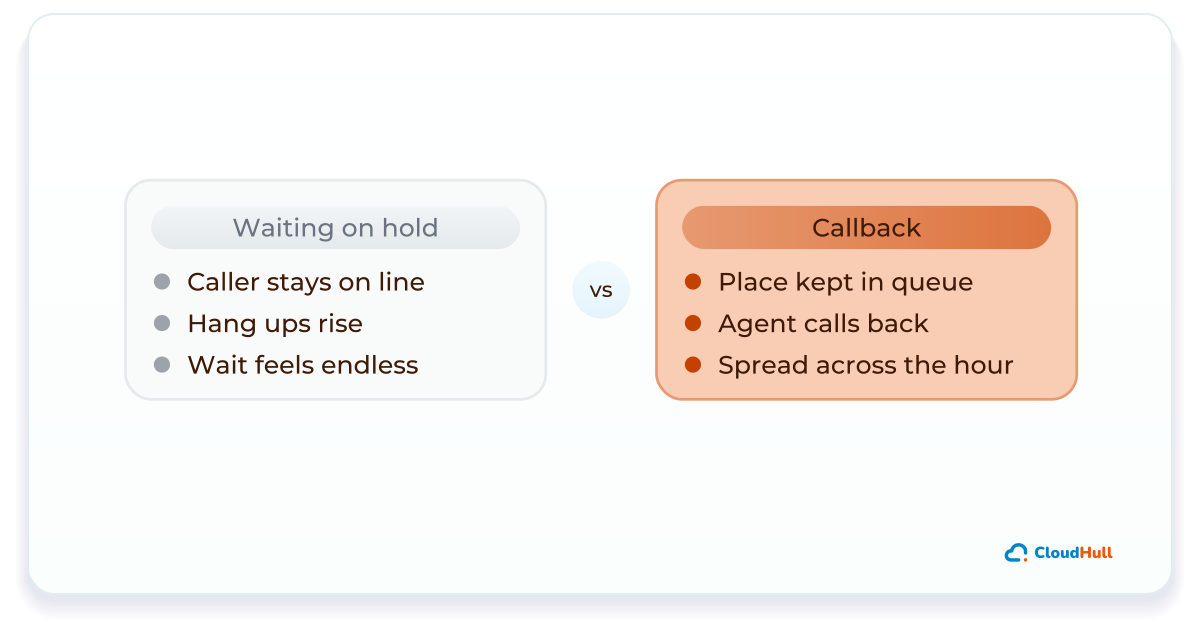
What happens behind the scenes
- The system estimates the wait and offers a callback above a threshold you set.
- The caller confirms the number and keeps their place in line.
- The queue reserves the slot, and the call is placed when an agent is free.
- If the caller does not answer, the system retries once and then sends a message.
- Reports show callback volume and answer rate by hour.
Tools that fit
Most cloud platforms include virtual hold and callback. The setting that matters most is the retry rule, so check how each one handles a missed call.
Skills-Based Routing by Intent
A software company routed every call to the next free agent, and billing questions kept landing with technical staff. We added a short question at the start, mapped intents to agent skills and sent each contact to the best match. Transfers per contact fell from about one in three to about one in eight.
Routing is only as good as your skill list. Agents tagged themselves with skills they wanted, not skills they had, until supervisors reviewed the list. Build a quarterly check into the process.
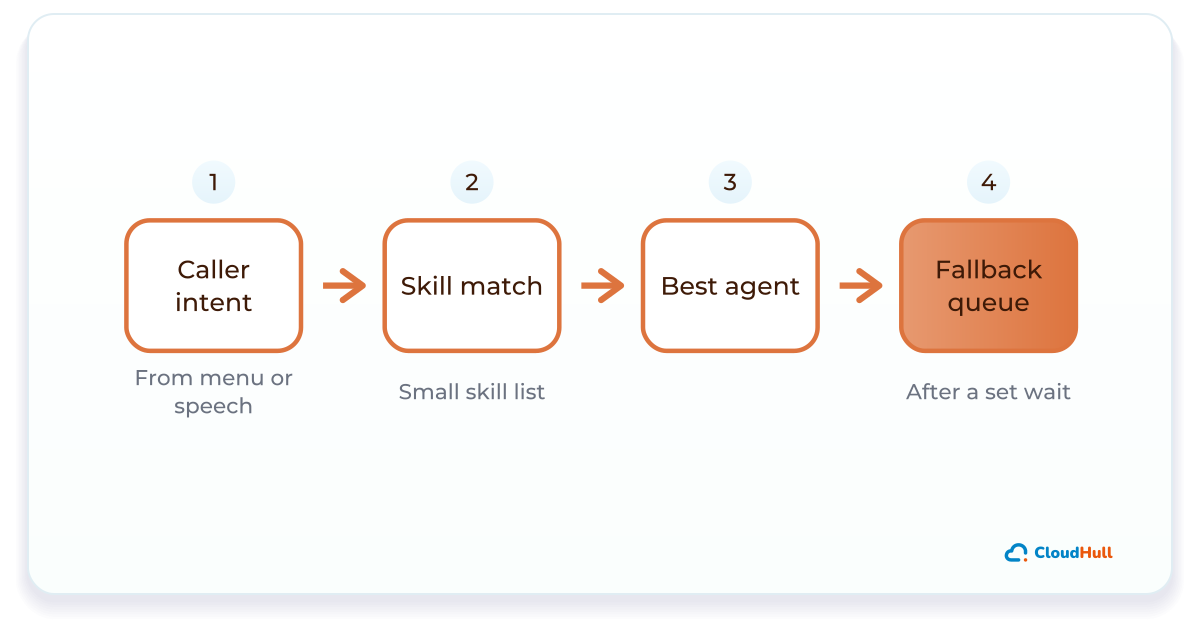
How a contact finds its agent
- Define five to eight intents based on a month of real contacts.
- Map each intent to a skill and a fallback skill.
- Ask for the intent in the menu or detect it from the first sentence.
- Route to the best-matched free agent, with a wait limit before the fallback applies.
- Review misroutes weekly and adjust the mapping.
What you need
The platform's routing engine handles the rules. You supply the intent list and a maintained skills table, ideally owned by the team leads.
Agent Assist During Live Calls
New agents at an ecommerce client took twice as long as veterans to resolve warranty questions. An assist panel now listens to the call, shows the matching knowledge article and drafts the next step. New hires reach veteran speed in about half the usual ramp-up time.
Veterans ignored it at first, which is fine. The value shows up in the first two months of an agent's tenure. Keep the panel quiet and short, or agents will switch it off.
From conversation to suggestion
- The call audio is transcribed in real time.
- The assistant identifies the topic and searches your knowledge base.
- It shows the best article and a short summary beside the call.
- The agent accepts, edits or ignores the suggestion.
- Ignored suggestions are logged, so you can find weak articles.
Where this lives
Several platforms include agent assist, and you can also build it with a speech service and a language model over your knowledge base. Source quality decides the result, so audit the content first. The knowledge angle is covered in my overview of cloud contact center trends.
Automatic After-Call Summaries
Agents at a SaaS support team spent a couple of minutes typing notes after every call. A summary drafted from the transcript now lands in the CRM for the agent to check and save. Wrap-up time dropped by about half, and notes became more consistent.
The surprise was data quality. Because summaries followed one format, managers could finally search for patterns across thousands of contacts. Agents still review every summary, because the system occasionally invents a detail.
Step by step
- The call ends and the transcript is finalized.
- A model drafts a summary using your template: issue, steps taken, outcome and next action.
- The summary appears in the agent's CRM view.
- The agent corrects it and saves.
- The saved note feeds reporting and the next contact's history.
Tools that fit
Built-in summarization on your platform is the fastest start. Pay attention to usage pricing, because each summary is a billable AI call on many plans.
Fraud and Identity Checks in the Flow
A payments client had agents verify callers with five security questions, which took minutes and tired both sides. We moved verification into the flow, with a one-time code sent to the registered phone and a voice or device check where the risk justified it. Agents now receive the call already verified and focus on the problem.
Compliance mattered here. Your legal and security teams must approve what is recorded, where it is stored and how payment data is masked, since the rules differ by region. Involve them in the design, not at the end.
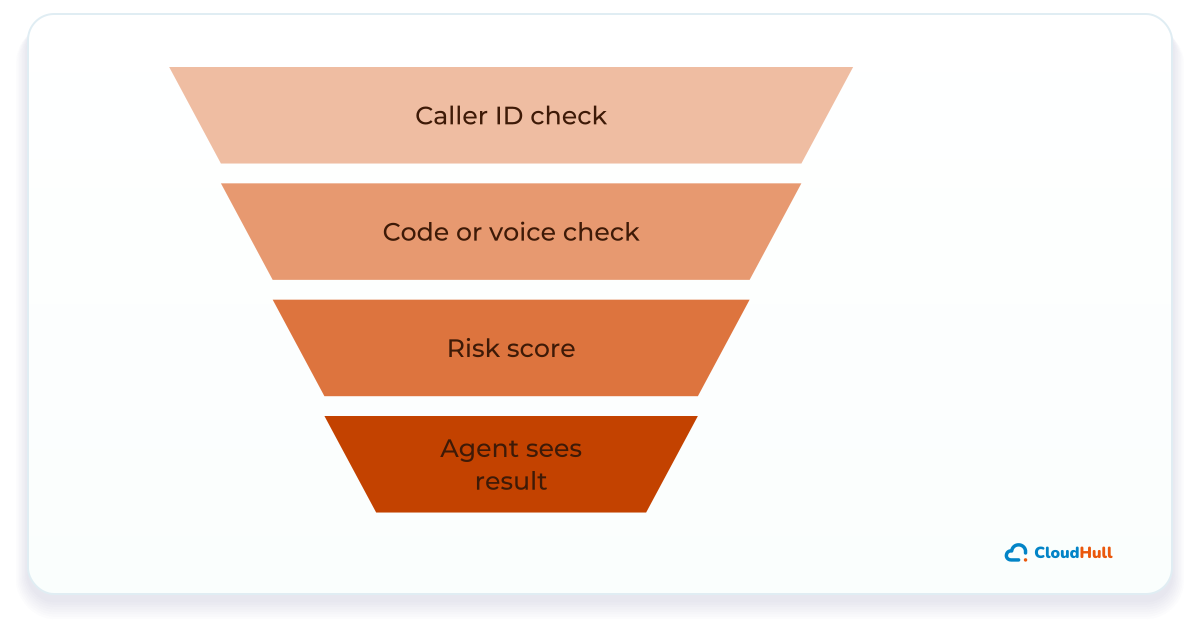
How verification works in the flow
- The system recognizes the number and looks up the account.
- A one-time code goes to the registered device or app.
- The caller enters it by keypad or says it.
- Risky requests trigger an extra step, such as a callback to the known number.
- Sensitive digits are masked in audio and transcript.
What you need
A platform with secure input and redaction features, plus an identity service. Check how the vendor handles card data, and confirm current requirements with your own advisers.
Burst Capacity for Seasonal Peaks
A travel retailer used to buy seats for the peak and run empty for ten months. On a usage-billed cloud platform, they scaled with demand and paid for the extra capacity only during the weeks it was used. In the first year, the contact center bill came in noticeably lower than the old seat model.
The catch was people, not software. Cloud capacity is instant and agents are not, so seasonal hiring and training still need an early start. Plan the human side as carefully as the technical side.
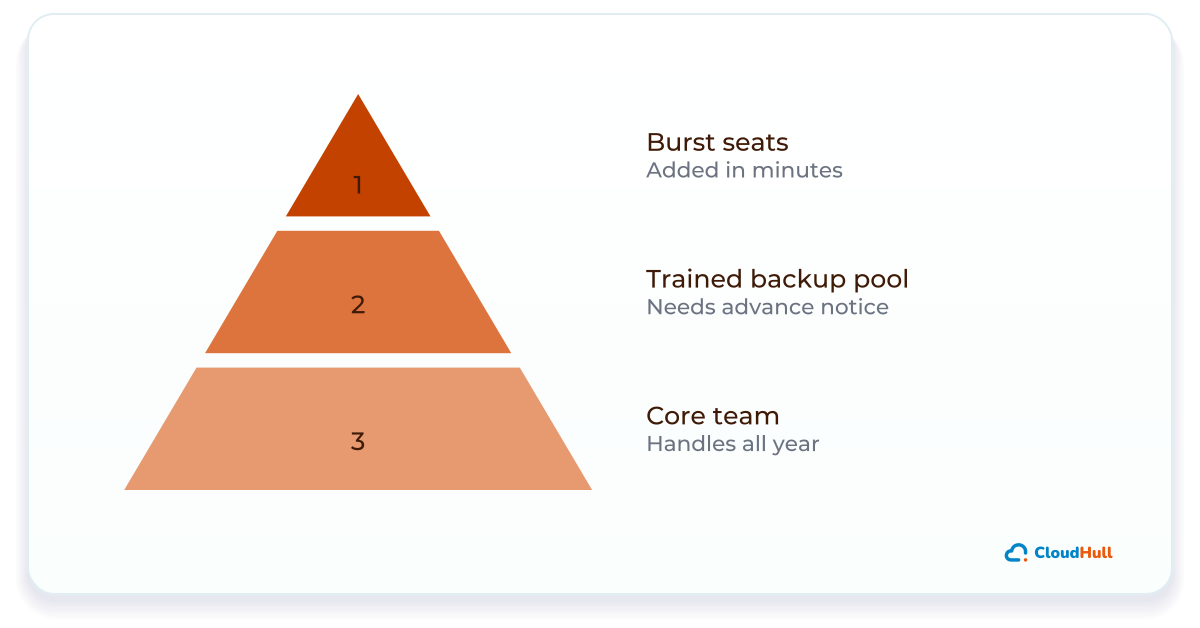
How peak scaling works
- Forecast contact volume by week and channel.
- Set platform limits and concurrency for the peak.
- Load-test calls and chats at peak levels.
- Add alerts for queue length and spend.
- Review after the peak and adjust the forecast.
Tools that fit
Usage-billed platforms such as Amazon Connect suit spiky volume. Ask each vendor for limits and quotas in writing, because default service limits can block a peak if nobody raises them in advance.
Unified Customer Record in the Agent Screen
A multichannel retailer's agents switched between four windows to see orders, tickets, chats and payments. We built a single agent view that pulled the key facts from each system on every contact. Customers repeated their story less often, and handle times fell by a few percent without any change in staffing.
Resist showing everything. The first version displayed forty fields and agents ignored it. The current one shows eight, chosen with the agents themselves.
How the agent view is built
- List the facts agents look up most often.
- Expose them through APIs or a customer data layer.
- Fetch them when the contact arrives.
- Show the top eight on screen, with links to details.
- Review which fields agents click and drop the rest.
Tools that fit
Most CRMs and contact center platforms support embedded panels. If your systems are old, a small integration layer in your own cloud account keeps the platform side simple. See how cloud contact center software options handle integrations.
Full-Coverage Quality Scoring
A support team of about forty agents reviewed five calls per person each month. Automated scoring now evaluates every conversation against the same rubric and flags the risky ones for a human. Supervisors find issues within days and spend their time on coaching instead of listening to routine calls.
Agents pushed back until we added a dispute button and a monthly calibration session. Scores that people cannot question damage trust fast. The rubric needs the same care as the software.
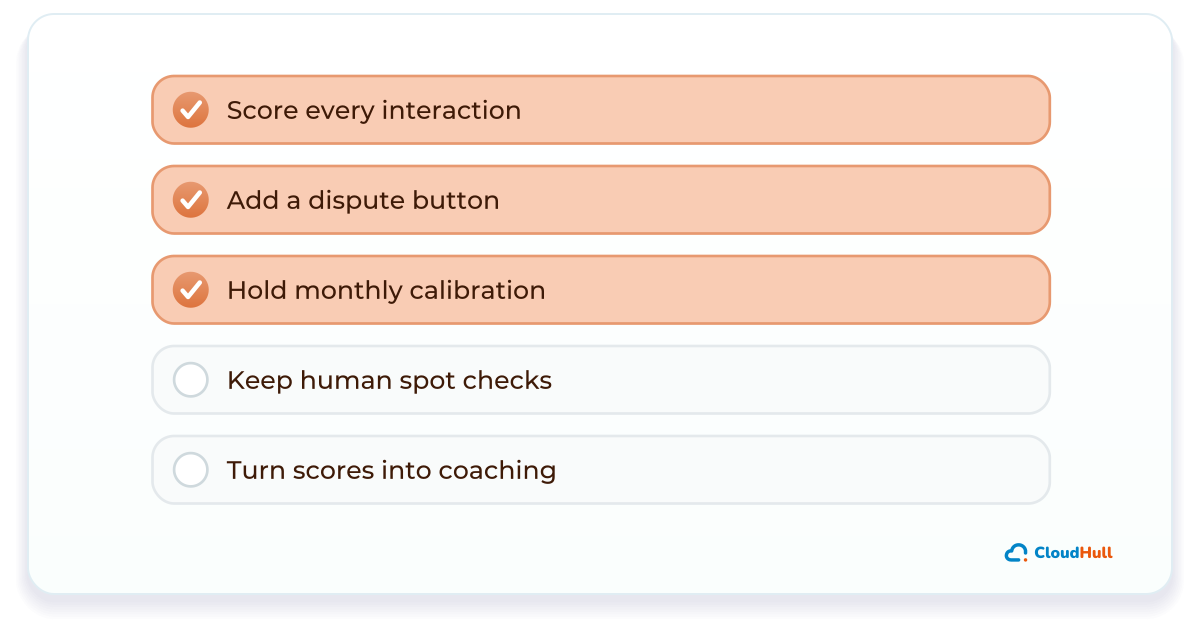
How scoring runs
- Calls and chats are transcribed after they end.
- A model scores each one against your rubric.
- Low scores and policy risks are flagged.
- A supervisor reviews flagged items and a random sample.
- Agents see their own scores and can dispute them.
Tools that fit
Quality features are built into several platforms and sold as add-ons by others. Test scoring against calls your supervisors already rated, before you trust the numbers. The wider shift is discussed in cloud contact center best practices.
Cost Tags and Budgets per Queue
A client's contact center bill grew every month and nobody could say why. We tagged usage by queue and feature, set a monthly budget for each and sent alerts at 80 percent. Within two cycles the team found a looping bot that was burning minutes, and fixed it. Spend settled and became predictable.
This is ordinary cloud cost control applied to customer service, and it takes about a week to set up. It is the example I most often wish clients had started with.
How the budget loop works
- Tag usage by queue, channel and AI feature where the platform allows it.
- Export usage to your cost tool or a spreadsheet.
- Set a monthly budget per queue.
- Alert owners at 80 and 100 percent.
- Review the top ten cost drivers every month.
What you need
Billing exports from your platform and a cost dashboard. If your platform bills by minute or message, add a hard cap for test environments so a bug cannot run overnight.
How to Pick the First Example to Build
Start where the pain is most measurable. If callers wait too long, look at callbacks and routing. If agents struggle, look at assist and knowledge. If the bill surprises you, start with example 10 and do not wait.
- The problem shows up in a report you already have.
- The data the feature needs is current and has an owner.
- A small pilot on one queue can prove it in four to six weeks.
- Security and legal have seen the design.
When you are ready to move from a pilot to a rollout, the order of work is laid out in the cloud contact center implementation guide.
Questions About Cloud Contact Center Examples
What Is the Most Common Cloud Contact Center Example?
Self-service for simple status questions, such as orders or appointments. It uses data you already hold, has one correct answer and keeps a person available for exceptions.
How Long Does a First Cloud Contact Center Project Take?
A single queue pilot usually takes four to eight weeks, including data cleanup and testing. A full platform change takes longer, often a few months, depending on integrations and the number of agents.
Do I Need to Replace My Platform to Try These Examples?
Often not. Many setups work on the platform you have, using its routing, callback or summary features. A replacement is worth considering when your current platform cannot offer the feature at a fair price.
How Do I Measure Whether an Example Worked?
Pick one number before you start, such as abandoned calls, handle time or contacts per order. Compare four weeks before and after, and watch customer satisfaction so you do not trade quality for speed.
Which Example Is Best for a Small Team?
Callbacks, after-call summaries and cost tags. They need little integration work and show results quickly, even with ten agents.
Are AI Summaries and Scoring Accurate Enough?
Good enough to draft and flag, not to decide alone. Keep a person reviewing summaries, and test automated scoring on calls your supervisors have already rated.
What Are the Risks I Should Plan For?
Wrong answers from stale knowledge, usage bills that grow unnoticed, and recording rules that differ by region. Each has a simple control: content owners, budgets with alerts, and a review by your legal adviser.
Disclaimer: This article is for general information only and is not legal, financial or compliance advice. Results are ranges from typical projects, and platform features and prices change, so check current details with your vendors and advisers.
Did this article help you?
Thanks, noted.
Garrett Linville
Garrett leads the Cloud Hull editorial team and works with the consultants to turn real client projects into practical guides on cloud migration, DevOps, security and cost control. Each article is edited together with the consultant who did the work, and every price and limit is checked against current provider documentation. He is based in the USA and works remotely.