Main Points
- Name one owner per data field before you connect anything.
- Use events for orders and stock, API calls for live answers and batch for reconciliation.
- Every strong example has retries, a dead letter path and an alert.
- Start with an integration whose failure shows up in revenue.
Integration advice is easy to find and hard to picture. The eight examples below are anonymized projects from my cloud integration consulting work, each with the problem, the pattern that fixed it and the steps you can copy.
They run from fintech to ecommerce, which are the two industries I see most. Numbers are rounded and come from my own client data. Use the table to jump to the one closest to your case.
Eight Integrations at a Glance
| Example | Industry | Pattern | Main gain |
|---|---|---|---|
| 1. Order-to-cash sync | Ecommerce | Events | Fewer lost orders |
| 2. Real-time stock levels | Retail | Events and cache | No overselling |
| 3. Payment reconciliation | Fintech | Batch plus API | Faster month-end |
| 4. Customer data in one view | SaaS | Replication | One customer record |
| 5. Carrier and shipping rates | Logistics | API gateway | Live quotes at checkout |
| 6. KYC and onboarding | Fintech | Orchestrated API calls | Shorter onboarding |
| 7. Hybrid ERP link | Manufacturing | Private connectivity | Cloud apps with on-premises ERP |
| 8. Partner file exchange | Healthcare | Managed file transfer | Audited, retryable transfers |
Eight Cloud Integration Examples With Steps
Each example has the same shape: what was wrong, what changed and how to repeat it. If you want the planning view first, start with the cloud integration strategy playbook and come back here for detail.
Order-to-Cash Sync for an Online Shop
A fashion retailer pushed orders from its shop to the ERP with a nightly job. Orders placed after the cut-off sat for a day, and a failed run meant someone found out at noon the next day. Customer service answered the same question many times a week.
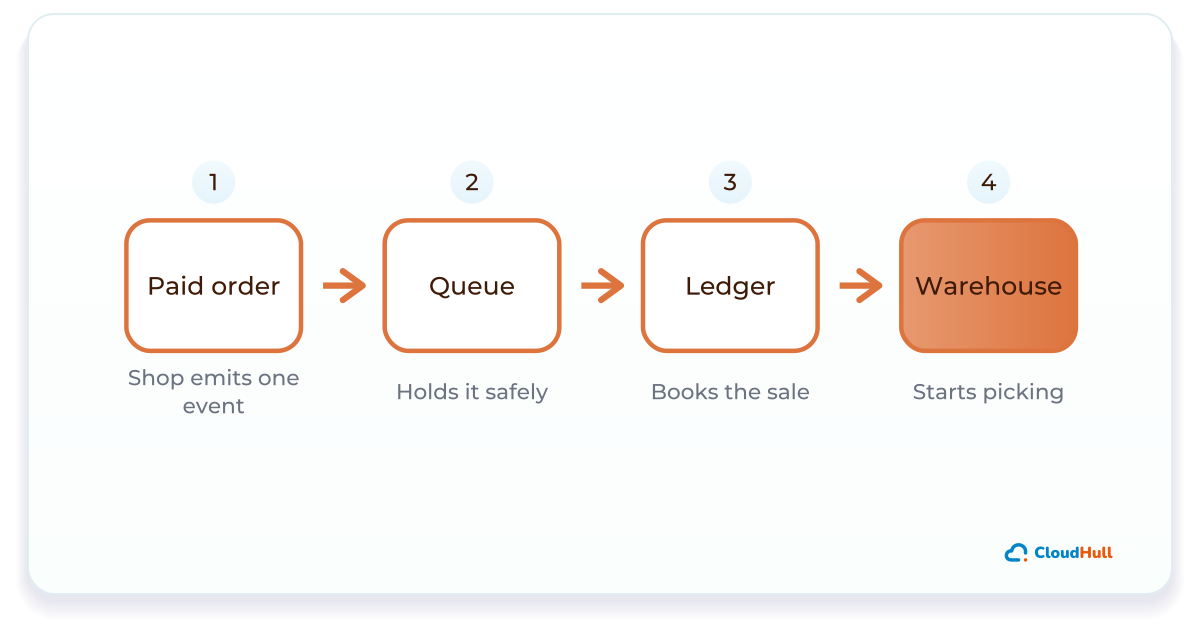
The fix was an event for every paid order, published to a queue and picked up by an ERP connector with retries and a dead letter queue. Median delay fell from hours to under a minute, and lost orders dropped to the few that landed in the dead letter queue and were fixed by hand.
How to repeat it
- Publish one event per paid order with a unique order ID.
- Make the ERP consumer idempotent so a retry never creates a second order.
- Add a dead letter queue and an alert when it is not empty.
- Replay a day of old orders in a test to prove the flow.
- Retire the nightly job only after two clean weeks.
Tools used
A managed queue from the cloud provider carried the events, and the ERP vendor's connector did the write. Any queue with retries and a dead letter option works.
Real-Time Stock Levels Across Channels
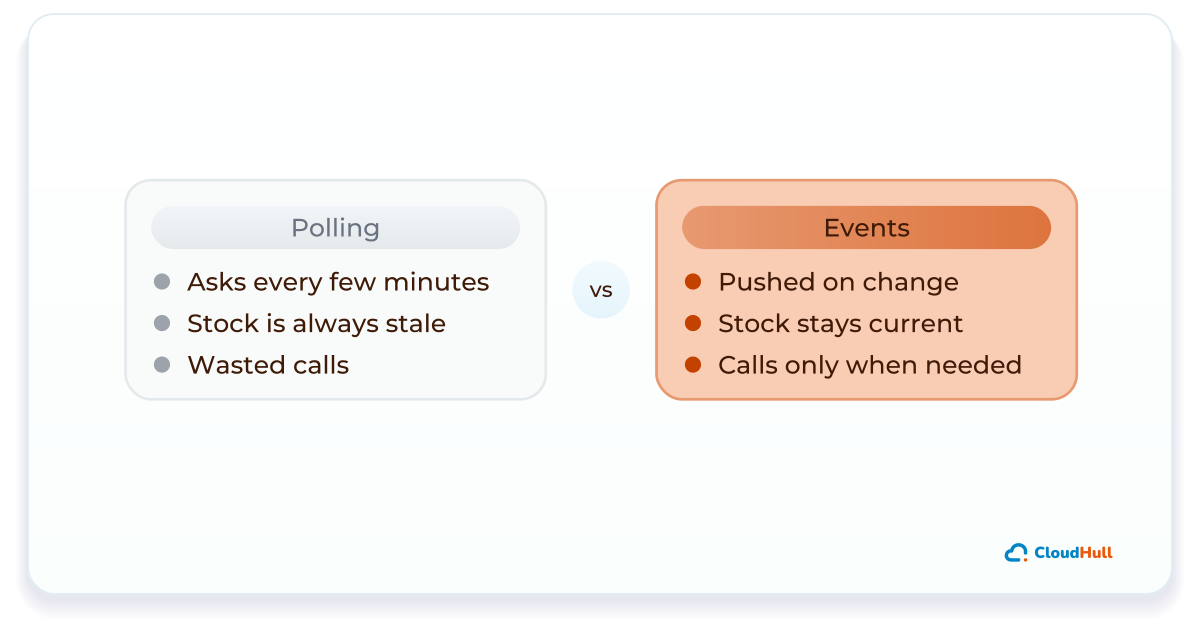
A home goods seller sold on its own shop and two marketplaces, and stock counts synced every 30 minutes. In busy weeks it oversold popular items, and refunds followed. The warehouse system was the true source, yet each channel kept its own copy.
Stock changes now publish as events from the warehouse system, and a small service updates each channel within seconds. A short-lived cache serves the shop's product pages. Overselling fell sharply, though not to zero, because marketplace rate limits still add a delay at peak.
How to repeat it
- Name the warehouse system as the single source of stock.
- Emit an event for every movement, not a total.
- Update channels from the events and keep a small safety buffer per item.
- Respect each marketplace's rate limits with a queue in front.
- Run a nightly count comparison to catch drift.
Tools used
An event bus handled fan-out to the channels, and an in-memory cache served reads. The marketplace APIs set the real speed limit, so test them early.
Payment Reconciliation for a Fintech
A payments startup matched processor reports with its ledger by hand over three days at each month-end. Differences were found late, and finance did not trust the numbers until someone checked them twice.
The team loaded the processor's daily settlement files and the ledger entries into one table and matched them by reference with an automated job. Unmatched items opened tickets with the amount and the likely reason. Month-end reconciliation shrank from days to hours in my client's own tracking.
How to repeat it
- Pull settlement files through a scheduled, logged transfer.
- Load both sides into a staging table with the same key.
- Match exact references first, then amounts and dates.
- Send each unmatched item to a queue with a reason code.
- Report the unmatched rate each day and track the trend.
Tools used
A scheduled batch job and an API call to the ledger covered it. A full integration platform was not needed.
One Customer View for a SaaS Company
A SaaS company kept customers in its billing tool, CRM and support desk, and each held a slightly different email and plan. Sales quoted renewals from stale data, and support could not see who was overdue.
The team picked the billing tool as the source for plan and payment status and replicated changes to the CRM and support desk every few minutes. A small mapping table matched accounts across tools. The duplicates shrank, and renewal quotes stopped using old plan data.
How to repeat it
- Decide which tool owns each field and write it down.
- Create a shared customer ID and store it in every system.
- Replicate changes one way, from owner to the others.
- Handle merges and deletions explicitly.
- Check mismatches weekly until the rate is near zero.
Tools used
A managed integration platform with ready connectors handled the replication. Its task-based price was low at this volume.
Live Carrier Rates at Checkout
A parts supplier showed flat shipping fees because its carriers' rate systems were slow and inconsistent. Large orders lost money on freight, and small ones scared buyers away.
An API gateway now fronts a small rate service that queries the carriers in parallel, caches answers for a few minutes and returns the cheapest valid options. A time limit of two seconds protects the checkout from a slow carrier, and a fallback flat fee covers the rare timeout.
How to repeat it
- Define the rate request once, in your own format.
- Call carriers in parallel with a strict timeout.
- Cache results for identical requests for a few minutes.
- Add a fallback fee for timeouts and log each one.
- Watch carrier error rates and drop the worst performer.
Tools used
The cloud provider's API gateway handled throttling and keys, and a small function did the work.
KYC and Onboarding for a Lending App
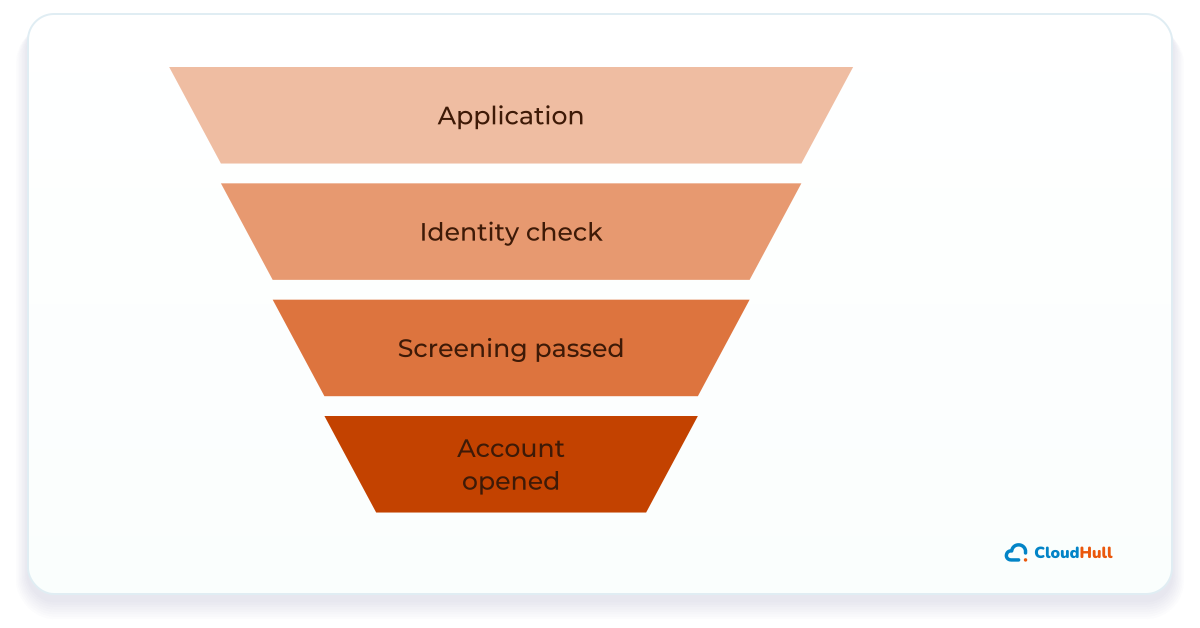
A lender checked identity, sanctions lists and bank data through three vendors in sequence, and each step waited on the last. Applicants quit during the process, and support tickets piled up.
The onboarding flow now calls the vendors in parallel where they do not depend on each other, tracks the state in a small workflow, and sends the applicant a clear status. Failures retry on their own, and unclear cases go to a person with all results attached.
How to repeat it
- Map which checks depend on each other and which can run together.
- Store the state of each application in one place.
- Retry transient errors with a delay, and stop on real rejections.
- Route unclear cases to a reviewer with the evidence.
- Keep an audit log for every call and decision.
Tools used
A workflow service such as Azure Logic Apps or AWS Step Functions orchestrates the calls. Choose the one that matches your cloud, and keep your audit log outside it.
Linking Cloud Apps to an On-Premises ERP
A manufacturer ran an on-premises ERP that could not move for another three years, but wanted cloud apps for sales and field service. Nightly exports left the cloud apps a day behind.
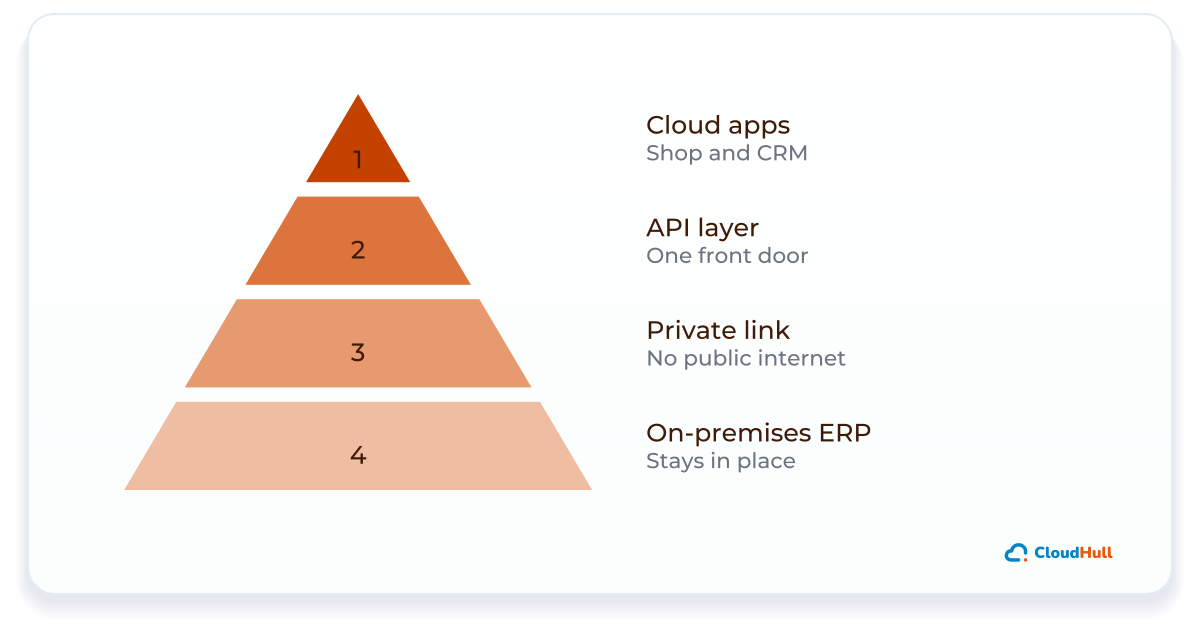
A private network link between the data center and the cloud, plus an integration runtime inside the data center, let the apps call the ERP's interface without exposing it to the internet. Changes now flow in minutes, and the ERP team controls what is exposed.
How to repeat it
- Choose a private link such as a VPN or a dedicated connection.
- Place the integration runtime next to the ERP, not in the cloud.
- Expose a narrow set of ERP functions through an API.
- Limit access by identity and network, and log every call.
- Test failover when the link goes down.
Tools used
A hybrid-capable platform, with a runtime agent in the data center, did the job. Check how each vendor prices that agent before you commit.
Partner File Exchange for a Healthcare Provider
A clinic network received lab results and sent claims as files through a mix of email and shared folders. Nobody could say which file had arrived, and a lost file meant a phone call.
The team moved the exchange to managed file transfer with delivery receipts, retries and an audit trail. Each file now has a status, and failures raise a ticket. Moving health data brings its own rules, so the security design was reviewed before launch.
How to repeat it
- List every partner and every file type.
- Move all transfers to one managed service with encryption.
- Require a receipt for each file and track it.
- Alert on missing files by expected time.
- Keep access logs for the period your rules require.
Tools used
A managed file transfer service from the cloud provider covered the transport. Check the legal and privacy requirements for your region with your own advisers.
What the Eight Examples Have in Common
Every example named an owner for the data, chose a pattern before a product and added a way to see failures. None needed exotic technology. The part that varied was the volume, and that changed the price more than the design. The habits behind that are listed in my cloud integration best practices.
The projects also share a cost shape. Setup is a few weeks of design and build. The ongoing cost is mostly the platform bill and the time spent fixing exceptions. If you want to compare platforms for that bill, see my ranking of cloud integration tools.
How to Choose Your First Example to Copy
Start with the integration where a failure shows up in revenue, as in examples 1 and 3. They are visible, easy to measure and low in political risk. Ask four questions:
- Does a failure cost money or customers directly?
- Is there one clear system that owns the data?
- Can you measure delay or error rate today?
- Can you run old and new side by side for two weeks?
If most answers are yes, you have a good first project. Where several are no, look at the cloud integration challenges before you build, because the missing answer is usually the problem you will meet first. The cloud integration framework gives you a model to organize the whole set.
Questions About Cloud Integration Examples
What Is a Common Example of Cloud Integration?
Syncing orders from an online shop to an ERP is the most common. Each paid order is published as an event, a connector writes it to the ERP and failures go to a retry queue.
Which Integration Pattern Should I Use?
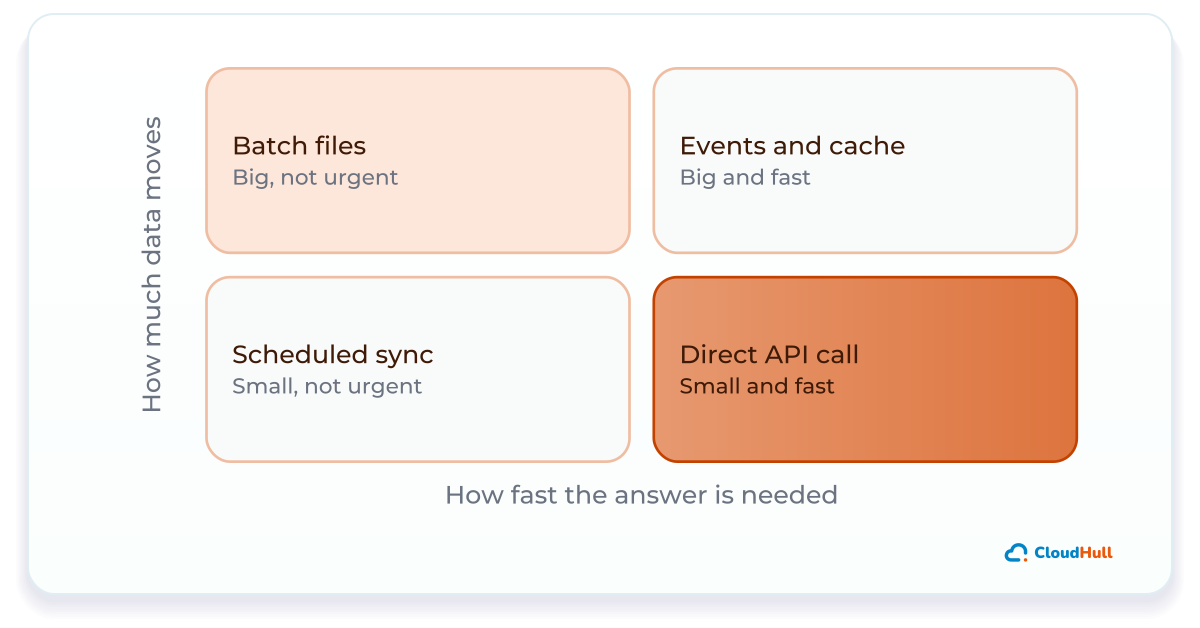
Use events when the sender should not wait, an API when the caller needs an answer now and batch when a delay of hours is fine. Replication suits data that many systems read.
Do I Need an Integration Platform for These Examples?
Not for all. Examples 3 and 5 ran on a scheduled job and a function. Examples 1, 4 and 6 gained from a platform with ready connectors.
How Long Does an Integration Like This Take?
A single well-defined flow often takes two to six weeks, including testing in parallel with the old process. Hybrid connections and regulated data take longer.
How Do I Avoid Duplicate Records on Retries?
Make the receiving side idempotent. Give each message a unique ID and ignore any ID you have already processed.
How Much Do These Integrations Cost to Run?
It depends on volume and on how the platform bills, by task, execution or connector. Estimate from real message counts, and review the bill monthly.
Can I Integrate On-Premises Systems with Cloud Apps?
Yes. Use a private network link and a runtime next to the on-premises system, and expose a narrow interface instead of the whole database.
Please note: this guide is general information and not legal, financial or tax advice. Numbers and examples are typical-project estimates; confirm current details with your providers and advisers.
Did this article help you?
Thanks, noted.
Garrett Linville
Garrett leads the Cloud Hull editorial team and works with the consultants to turn real client projects into practical guides on cloud migration, DevOps, security and cost control. Each article is edited together with the consultant who did the work, and every price and limit is checked against current provider documentation. He is based in the USA and works remotely.