Main Points
- Total cost over five years, divided by the capacity you really use, is the number to compare.
- People and utilization move the cost per workload far more than the hardware price.
- Licensing has changed for some platforms, so get written multi-year quotes and one alternative.
- Budget with a 15 to 20 percent contingency, and include migration and the retirement of old systems.
Private cloud cost is hard to pin down because the price lives in five different budgets: hardware, software, facilities, people and change. When a client asks me what a private cloud costs, I first ask what is already being spent. A fair comparison starts there. If you want help building that baseline, my private cloud consulting engagements begin with the same sheet.
This guide gives you a formula, a worked example with stated assumptions, a table of the cost lines people forget and a way to set a budget. The example numbers are mine and illustrative, so replace them with your own quotes.
The Formula I Use for Total Cost
Take the total cost of ownership over three to five years and divide it by the capacity you really use. In words: hardware plus software plus facilities plus people plus migration, minus what you retire or resell, divided by the number of virtual machines or cores in productive use.
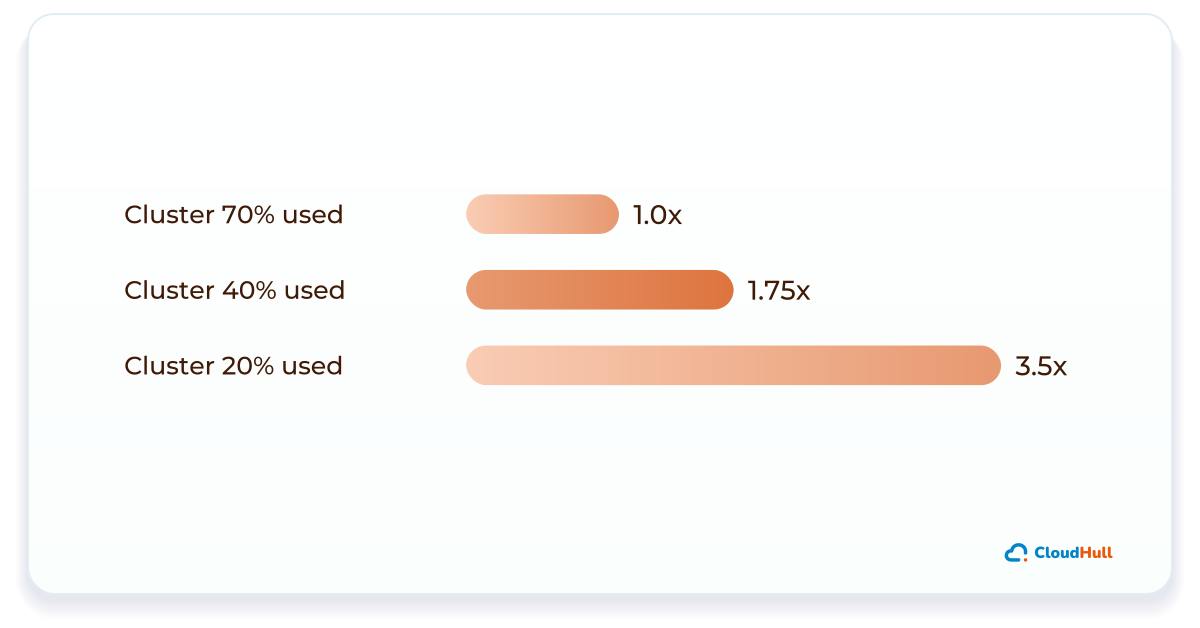
The last part matters most. A cluster that is half empty costs twice as much per workload as one that is full. That is why utilization shows up in every cost conversation I have.
| Cost line | What it includes | Often forgotten |
|---|---|---|
| Hardware | Servers, storage, network switches, racks | Spare parts, refresh cycle, support contracts |
| Software | Virtualization or cloud platform, operating systems, backup, monitoring | Renewal changes, add-on modules, per-core minimums |
| Facilities | Power, cooling, space, or colocation fees | Power price rises, remote hands fees |
| People | Platform engineers, on-call time, training | Hiring time, turnover, vendor training |
| Migration | Planning, testing, cutover, dual running | Old hardware kept alive for months |
| Security and compliance | Logging, audits, vulnerability scanning | Evidence collection time |
A Worked Example With Stated Assumptions
Imagine a mid-sized company that runs 200 virtual machines on two data centers. These figures are assumptions to show the method, not quotes. Hardware refresh for the estate: 600,000 dollars over five years. Platform licenses and support: 40,000 dollars per year. Colocation, power and network: 120,000 dollars per year. Two platform engineers: 280,000 dollars per year in total cost. Migration project and dual running: 150,000 dollars once.
Over five years that comes to 600,000 plus 200,000 plus 600,000 plus 1,400,000 plus 150,000, or 2,950,000 dollars. Divided by 200 virtual machines and 60 months, the cost is about 246 dollars per virtual machine per month. The surprise for many readers is the people line, which is nearly half of the total.
| Line | Five-year cost | Share |
|---|---|---|
| Hardware | $600,000 | 20% |
| Software | $200,000 | 7% |
| Facilities | $600,000 | 20% |
| People | $1,400,000 | 47% |
| Migration | $150,000 | 5% |
| Total | $2,950,000 | 100% |
Now test the example. If utilization drops from 70 percent to 40 percent, the same estate hosts fewer machines per dollar, and the cost per productive workload rises by about three quarters. If you can trim the engineering team to one and a half people through automation, the total falls by roughly 700,000 dollars. Both moves matter more than a 10 percent discount on hardware.
Software Licensing: The Line That Moved
Software used to be the predictable line. It is less so now. Since Broadcom bought VMware, licensing has moved to subscriptions, and Broadcom’s product page for VMware Cloud Foundation gives no price, pointing to partners instead. It also states that advanced services are separate purchases. In my client work, the practical advice is to ask for a written multi-year quote and to compare it with a quote from at least one alternative.
Some prices are public. Proxmox lists subscriptions per CPU socket per year: €120 for Community, €370 for Basic, €550 for Standard and €1,100 for Premium, net of VAT. Microsoft bills Azure Local per physical core per month, with an optional Windows Server guest subscription listed at 23.3 dollars per core per month, and it offers a 60-day free trial. These details change, so check current pages. My private cloud platforms ranking tracks them for each vendor.
Owned, Hosted and Pay-Per-Use Compared
How you buy changes the shape of the cost more than the total. Owning hardware means a large upfront purchase and low monthly costs. Hosted private cloud means a monthly fee with little upfront cost. Pay-per-use programs bill on consumption, often with a minimum.
| Model | Upfront | Monthly | Main risk |
|---|---|---|---|
| Own the hardware | High | Low to medium | Idle capacity and refresh costs |
| Hosted private cloud | Low | Medium to high | Contract lock-in and exit terms |
| Pay per use from a vendor | Low | Variable with a floor | Minimums or reserve capacity |
HPE, for example, describes pay per use, subscription and purchase options for GreenLake, and notes that pay per use may be subject to minimums or reserve capacity. AWS states that Outposts capacity is bought for a three-year term, with All Upfront, Partial Upfront or No Upfront payment, and that ordering requires AWS Enterprise Support. Read those terms as cost items, not as footnotes.
Cost Shape for Smaller Companies
Small companies get less from scale and more from simplicity. A hosted option or a low-cost platform with paid support usually beats a large stack, because the people cost does not shrink with the license fee. My guide to private cloud for small business shows which options fit a small team.
How to Set Your Budget
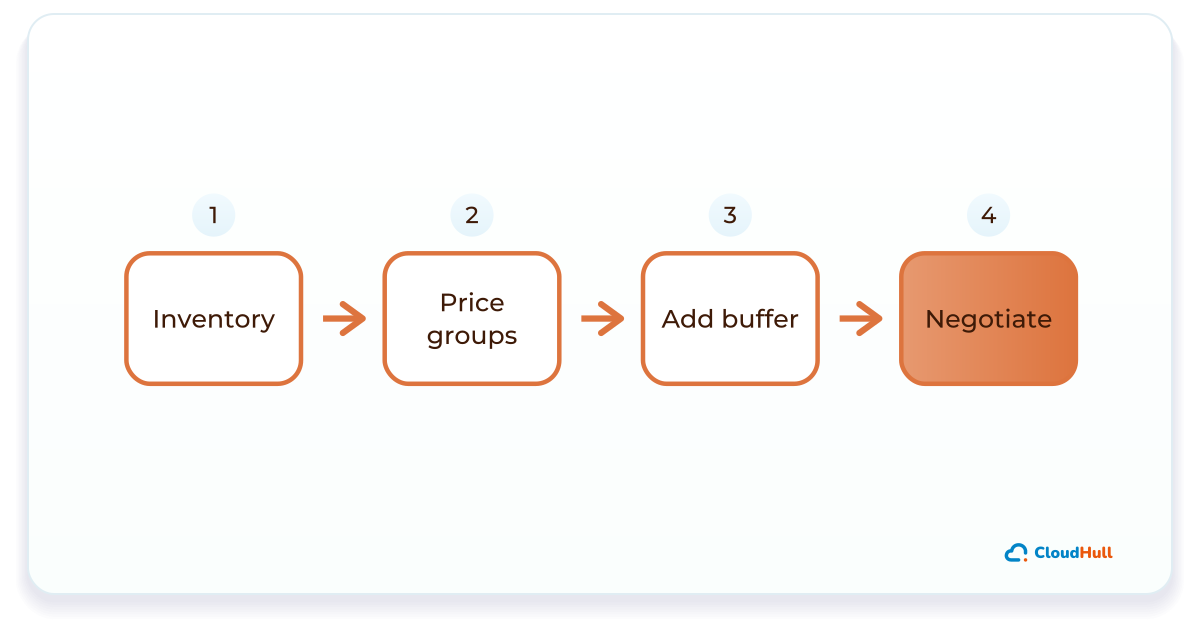
Build the budget in four steps. First, list what you spend today across hardware, licenses, hosting, power and staff time. Second, measure utilization over at least a full business cycle. Third, price two or three options with written quotes. Fourth, add a contingency, which I set at 15 to 20 percent for first projects in my own work, then lower it as your team gains experience.
Compare options on the same basis: five years, same capacity, same availability target, same security controls. Many comparisons I review fall apart because one option includes backup and disaster recovery while the other does not.
Do not forget the cost of delay. Old systems kept running during a slow migration are a real cost line. The private cloud implementation guide explains how to schedule retirement dates so that overlap stays short.
Questions to Ask Before You Negotiate
Negotiation goes better when you know which lines are flexible. Hardware vendors discount heavily on large orders and less on support. Software vendors discount for longer terms, and the discount can disappear at renewal. Colocation providers negotiate on commitment length and power density.
Ask each vendor the same questions in writing. What is the price at renewal, and is there a cap? What happens to the price if my core count grows by 30 percent? Which features are included and which are add-ons? What is the minimum commitment? How do I get my data and my configuration out if I leave? Vendors who answer clearly are easier to work with later, and the answers go straight into your cost model.
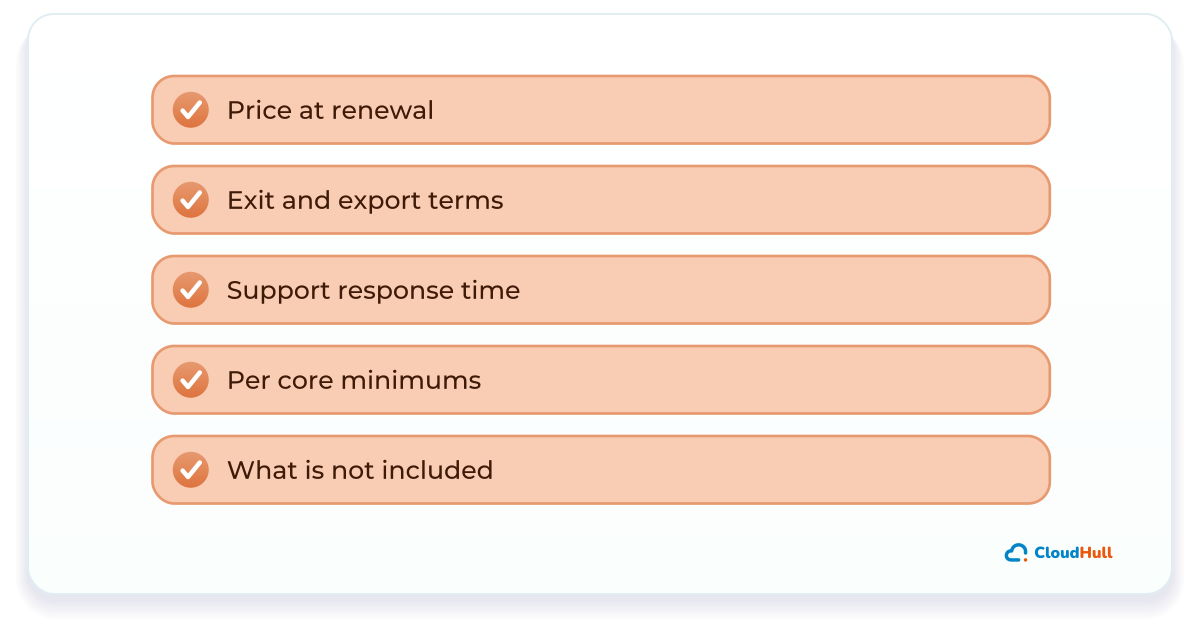
I also ask about the support model. A cheaper support tier with slow response times costs real money when a storage controller fails on a Friday afternoon. Put an hourly cost on downtime for your key systems, and use that number to decide which support level is worth paying for.
Cost by Workload Type
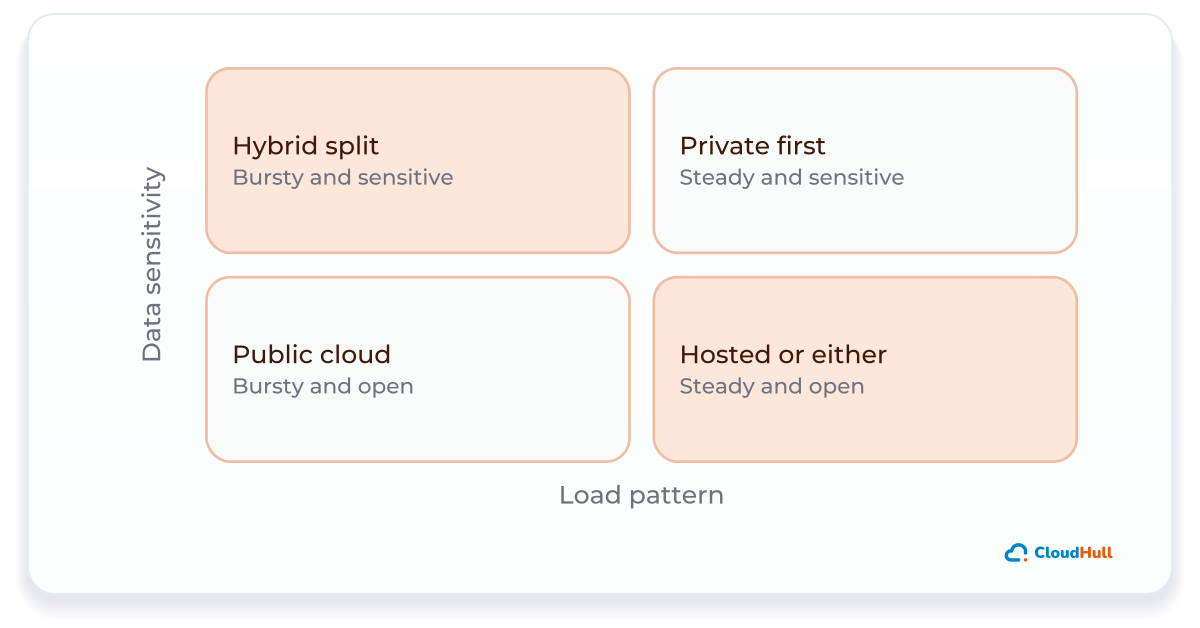
Not all workloads cost the same to run privately. A steady database with heavy storage needs and a predictable load is the best candidate, because you use the hardware around the clock. A web front end with large traffic swings is a poor candidate, because you pay for peak capacity all year. Batch and analytics jobs fall in the middle: cheap on owned hardware when the queue is always full, expensive when the cluster idles between jobs.
In my client work, I split the estate into three groups before I price anything: always-on, predictable peaks and unpredictable. The first group is where a private cloud usually earns its place. The second group often suits a hybrid design. The third group almost always belongs in the public cloud. Pricing each group separately avoids the trap of averaging the whole estate and reaching a conclusion that suits none of it.
Support, Spares and the Refresh Cycle
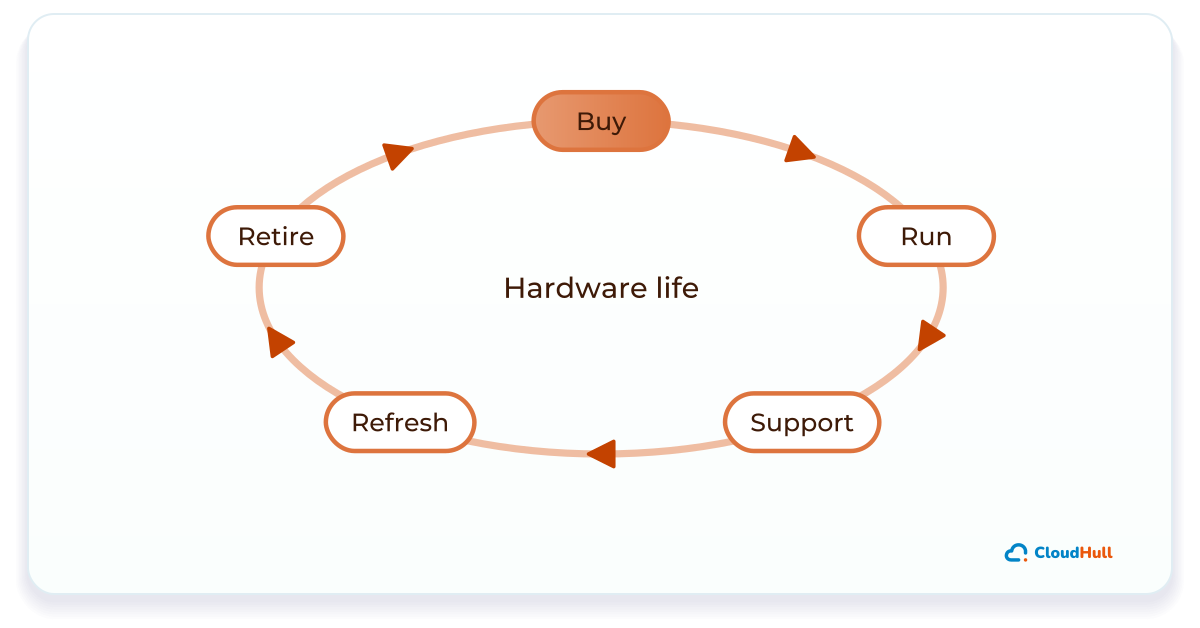
Hardware has a life. Most servers are refreshed every five years or so, and support contracts get more expensive as they age. Plan the refresh into the cost model from the start, as a recurring line and not as a surprise in year five. Keep a small pool of spares for parts that fail often, such as drives and power supplies, and decide whether you want next-business-day parts delivery or a four-hour service level. The faster the service level, the higher the price, and the answer depends on what an hour of downtime costs you.
A final point on support: ask who you call when the issue sits between the hardware vendor and the platform vendor. Finger-pointing between them can stretch an outage from hours into days. A single support contract, or a partner who coordinates both, is worth real money here.
Where Teams Actually Save Money
The savings I see most are modest and dependable. Rightsizing virtual machines that were set up with too much memory often frees a fifth of capacity. Retiring forgotten test environments frees more. Standard automation lowers the engineering hours per workload. Finally, a consistent hardware model cuts spare parts and support contracts.
Savings from moving workloads between private and public cloud are real but uneven. Steady workloads tend to cost less on owned or reserved capacity, and spiky workloads cost less in the public cloud. The balanced view is in my private cloud pros and cons verdict, and the private cloud examples show the numbers play out in different sectors.
How to Check Your Own Numbers
Before you approve a budget, run through this list:
- Does the comparison cover five years and the same capacity for every option?
- Is the people line based on named roles and real hours?
- Are backup, disaster recovery and security tooling included in every option?
- Have you asked for renewal terms and exit costs in writing?
- Is there a retirement date for the systems the private cloud replaces?
If any answer is no, fix it before the budget goes to approval.
Questions About Private Cloud Cost
How Much Does a Private Cloud Cost?
It depends on size and model. A small hosted setup can start with a monthly contract, while an owned multi-site estate costs hundreds of thousands to millions over five years. People and utilization drive the cost more than hardware.
Is Private Cloud More Expensive than Public Cloud?
It can be for spiky workloads and less expensive for steady, highly utilized ones. Compare five-year totals including staff, backup and security, not monthly prices.
What Is the Biggest Hidden Cost?
People. Platform engineers, on-call time and training often make up close to half of the total in my cost models. The second is old systems kept running during migration.
How Much Do VMware Licenses Cost Now?
Broadcom does not publish a price on its VMware Cloud Foundation page. Request a written quote through a partner, ask about minimums and compare it with an alternative.
Are There Free Private Cloud Options?
OpenStack is open source under the Apache 2.0 license, and Proxmox software is free with paid support. Both still cost hardware and engineering time.
How Should I Budget a First Private Cloud Project?
Compare five years of cost for two or three options, add a contingency of 15 to 20 percent and include migration and dual running. Review the budget after the pilot.
Does Pay-per-Use Private Cloud Save Money?
It can lower upfront spend, though vendors may apply minimums or reserve capacity. Read the metering rules and exit terms before you sign.
Disclaimer: Prices and licensing terms change often. The vendor figures here were checked when this article was last updated, and the worked example uses assumptions, not quotes. Confirm current prices with each vendor. Nothing in this article is legal or financial advice.
Did this article help you?
Thanks, noted.
Garrett Linville
Garrett leads the Cloud Hull editorial team and works with the consultants to turn real client projects into practical guides on cloud migration, DevOps, security and cost control. Each article is edited together with the consultant who did the work, and every price and limit is checked against current provider documentation. He is based in the USA and works remotely.